S11 AI panel
Ask Claude to design with the selection as context.
The AI panel replaces the right panel’s tabs when the AI toggle (header sparkle) is on; the right panel widens to 360. It closes with Esc or the toggle. Hidden when ud.ai.enabled is false (AI-13).
The panel is disabled in VS Code Restricted Mode (workspace not trusted): a claude run would load the workspace’s .claude/settings.json, CLAUDE.md, skills and .design-ai.md, which are untrusted there. The toggle stays visible but opens the panel in a single state: ud-banner with lock, “Claude is off in Restricted Mode. Trust this workspace to use it.”, a “Manage Workspace Trust” link button (runs workbench.trust.manage) and the composer hidden. Quick actions’ “Ask Claude” rows, the canvas context menu’s “Ask Claude…”, the S01 prompt field and the AI tool bar button are disabled with the tooltip “Not available in Restricted Mode”. Agent activity through ud (S12) is unaffected.
S11a Prompt#
| Purpose | Ask Claude to design with the selection as context. |
| SRS | AI-4, AI-6, AI-9, AI-10, AI-13, AI-15 |
| Contents | Header 40: “Claude”, conversation dropdown (“New conversation”, recent), “…” (Settings, Apply directly toggle), close. Empty state: 4 suggestion cards 328 × 48 (“Design a sign-up screen”, “Review this frame for accessibility”, “Fill with realistic content”, “Create dark mode variant”). Composer at the bottom: context chips row (“Login” frame chip, “Acme DS” chip, and a .design-ai.md chip with a file icon when the workspace has one), text area 3–10 lines body, attachments row (image thumbnails 40), bottom row: attach button, model tier dropdown (“Design · opus”), Send primary button (Ctrl+Enter). |
| Trust inputs | The .design-ai.md chip marks a trust input: its content goes to the model as instructions. Its tooltip reads “Instructions from .design-ai.md in this workspace · Open”; clicking opens the file. The chip cannot be dismissed while the file exists, so the user always sees that a workspace file steers the turn. |
| States | Empty; typing; with image attachment; AI not configured (“Claude Code not found · Install” with link); signed out or not licensed (LIC-2); Restricted Mode (banner only, see the S11 introduction). |
S11b Streaming steps#
| Purpose | Show what Claude does while it works. |
| SRS | AI-4, AI-11, AI-14, UI-7 |
| Contents | User message bubble (right aligned, input background, radius 8). Assistant turn: short text streamed in body; ud-step-row list: “get_metadata · Read Login · 0.2s”, “use_figma · Created 4 frames, 12 layers · 1.8s” (expandable script), “get_screenshot · 0.6s” with thumbnail, “ud lint · 2 warnings · 0.4s”. Progress bar 2 px progress under the header; “Stop” danger button replaces Send; step and time counters “Step 4 of ≤ 30 · 0:42”. |
| Canvas | Proposal changes appear live on a scratch branch: canvas shows the review bar (S11c) in “working” state; new nodes flash in Claude’s colour. |
| States | Running; tool error (step row danger, Claude continues); cancelled (“Cancelled · document unchanged”; under Apply directly: “Cancelled · changes rolled back”, see S11c); failed (same wording with “Failed”); limit reached. |
S11c Proposal review#
| Purpose | Accept or discard an AI turn as one undo step. |
| SRS | AI-5, AI-4 |
| Canvas | Review bar 44 tall, top centre at y 12 (replaces the agent pill), radius 12, raised: sparkle + “Proposal · 14 changes”, segmented Before / After / Split, “Discard” secondary, “Accept” primary. Split view divides the canvas with a draggable vertical line. Diff outlines (§4.31). Panels are not editable while reviewing (banner in the right panel). |
| AI panel | Assistant summary; “Changes” list grouped by frame (rows: change icon added/changed/removed in success/orange/danger, layer name, property summary); clicking a row selects and zooms to the node; per-row “Revert” is out of scope for 0.7 (all or nothing). Follow-up composer stays active (“Refine…”). |
| Explicit changes | Four kinds of change are never folded into a count; each gets its own row with its own icon and summary, because they are easy to miss on the canvas: text changes (text-size icon, old → new, “Sign in → Continue”, long strings truncated with a “Show diff” expander), renames (symbol-string icon, “Form → Login form”), hidden nodes (eye-closed icon, “Hidden: Forgot?”, hidden nodes also listed under their frame even when nothing else changed) and plugin-data writes (database icon, “Plugin data: codegen.component on Button”, with the key and a value preview). The review bar count (“14 changes”) includes them, and the group header shows per-kind counts on hover (“3 text · 1 rename · 1 hidden · 2 plugin data”). |
| States | Accepted (toast “Applied 14 changes · Undo”); discarded (toast); apply directly mode (no review bar, changes already applied with Undo toast; the “Changes” list is still shown with the explicit rows above); apply directly, cancelled or failed (the turn’s changes are rolled back as one undo step, the review bar shows nothing, and the toast reads “Cancelled · 6 changes rolled back · Redo” so the partial result is recoverable). |
Figma frame S11a (annotated)
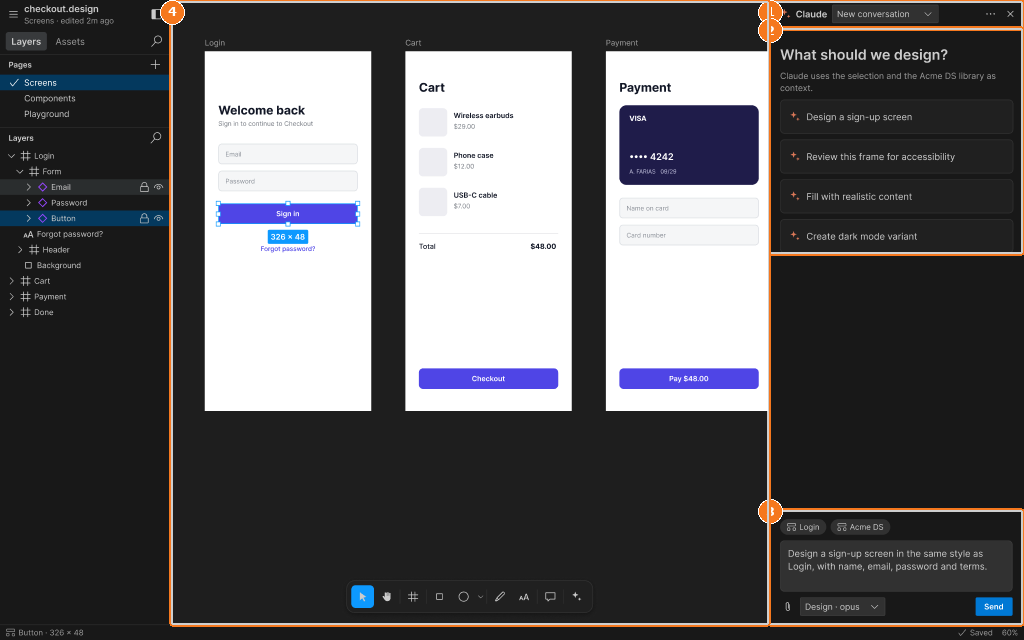
Callouts:
- AI panel header: Claude, conversation, more, close
- Suggestion cards
- Composer: context chips, prompt, attach, model, Send
- Canvas narrowed to 840 px
Figma frame S11b (annotated)
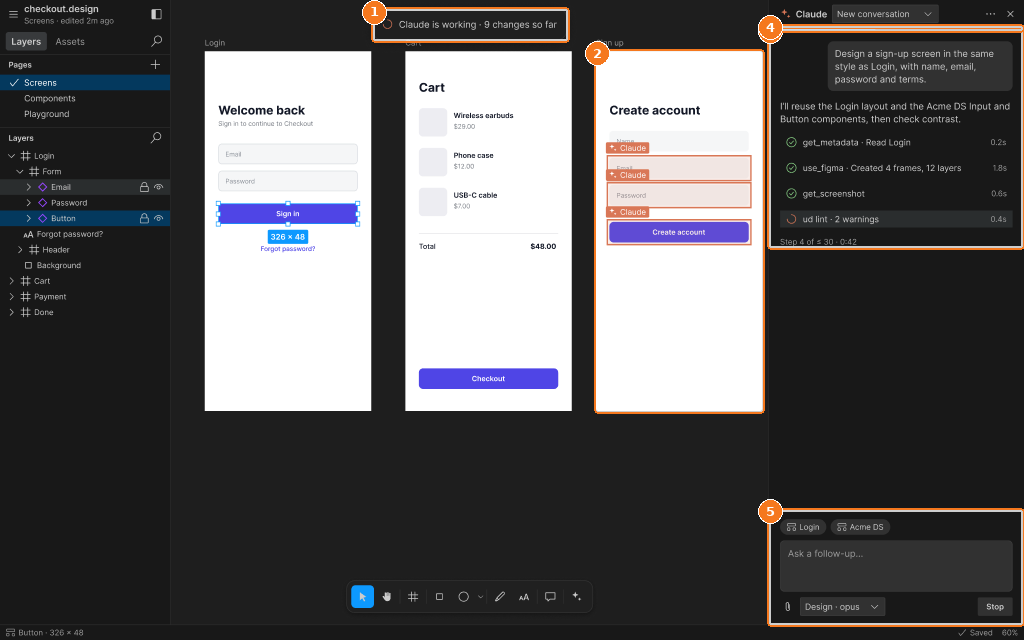
Callouts:
- Working pill: changes so far
- New frame; agent flashes on created nodes
- Conversation: prompt, streamed text, step rows with timings, step counter
- Progress bar
- Composer with Stop
Figma frame S11c (annotated)
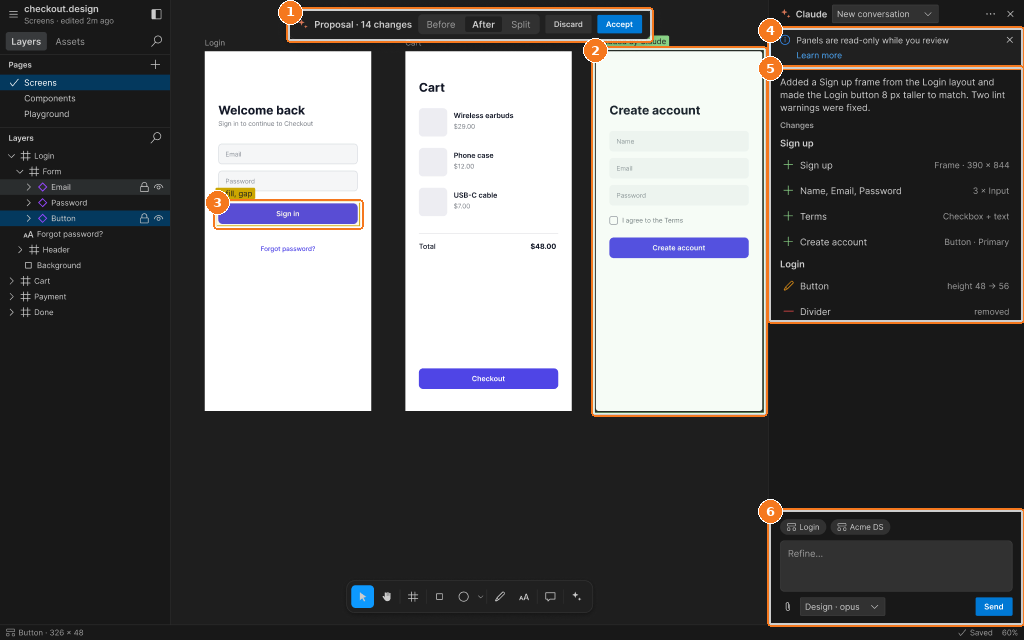
Callouts:
- Review bar: Proposal · n changes, Before / After / Split, Discard, Accept
- Added frame outline (green)
- Changed node outline (orange)
- Panels read-only banner
- Summary and change list
- Refine composer