S07a Assets
Find and insert components and styles.
| Purpose | Find and insert components and styles. |
| SRS | CMP-7, VAR-1, VAR-7 |
| Left panel | Tab “Assets” active. Search 216. “Libraries” button (library icon) right of search. Groups (collapsible ud-sections): “Local components” (grouped by page and section, grid of ud-asset-tiles, 3 columns), “Acme DS” (library, with version and “Updates available” badge), “Colour styles” (rows: swatch 16 + name), “Text styles” (rows: “Ag” preview + name + size/line height tiny), “Effect styles”, “Grid styles”. View toggle grid/list. |
| States | Search results (highlighted characters); empty search (“No assets match”); dragging a tile onto the canvas (ghost + drop position guides); no libraries (“Enable libraries”). |
Figma frame S07a (annotated)
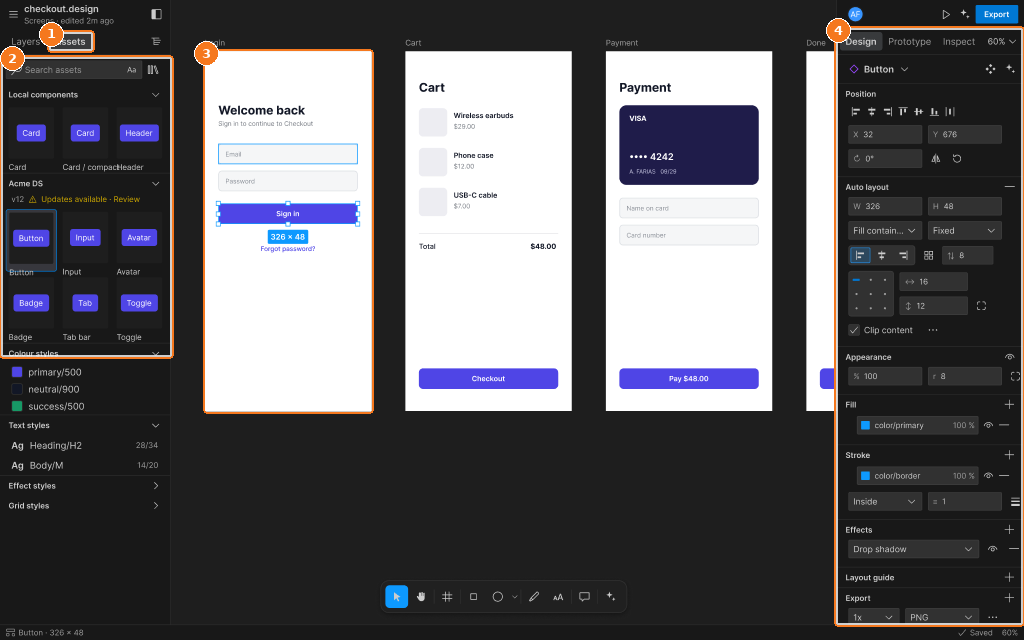
Callouts:
- Assets tab active
- Asset tiles grouped by section, search above, drag to insert
- Login frame
- Design tab