S05 Design tab: component instance
Edit an instance through its component properties.
| Purpose | Edit an instance through its component properties. |
| SRS | CMP-2..CMP-6, CMP-8 |
| Selection | Instance “Button” of component set “Button” (Acme DS library) |
| Right panel | Selection header: instance icon purple, name “Button”, swap dropdown (component name with chevron, opens an asset browser popover 264 × 400 filtered to compatible components), “…” with Go to main component, Reset all overrides, Detach instance (Ctrl+Alt+B), Push changes to main (when local). Link “Go to main component” in link with target icon. Properties section (purple title icon): variant dropdowns (Variant: Primary, Size: md, State: Default), boolean toggles (Icon left: on), text property fields (Label: Sign in), instance swap property (Icon: arrow-right with asset popover). Each overridden property has an orange dot and a “Reset” item in its context menu. Then Position, Layout, Appearance, Fill, Stroke, Effects, Export with override dots. |
| Canvas | Purple selection box; hovering a nested instance shows a purple dashed outline. |
| States | Main component selected (header shows “Component”, Properties section lets you add properties with “+”); component set selected (variants table, add variant); instance from a library with updates available (banner “Button has updates · Review”). |
Figma frame S05 (annotated)
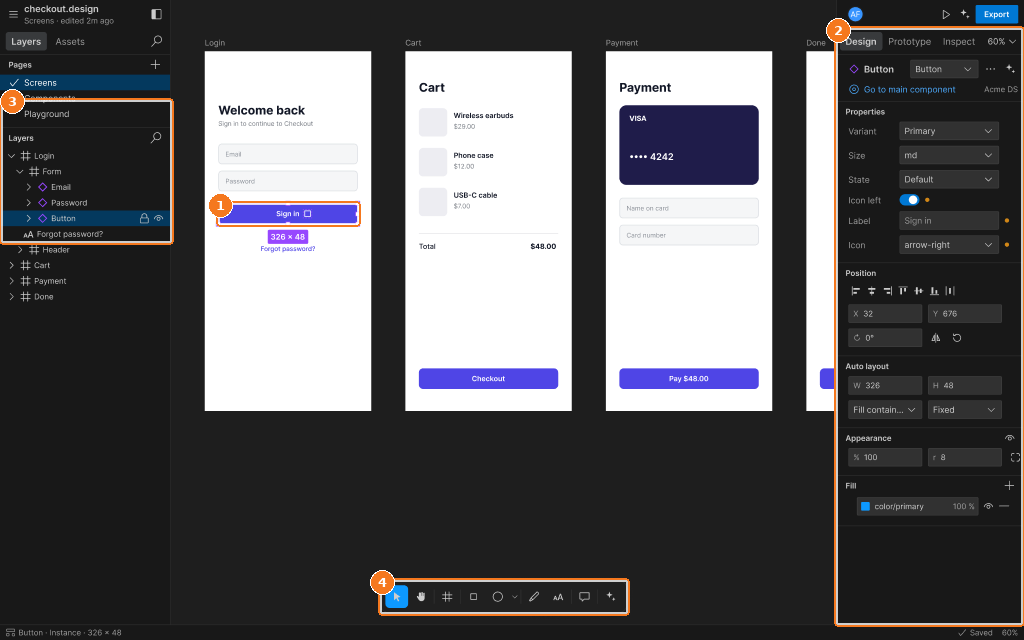
Callouts:
- Instance selected (purple selection colour)
- Instance section: main component, variant pickers, override dots, “Go to main component”
- Layers: instance icon and lock/eye toggles
- Toolbar