S08 Prototype tab and connections
Define interactions and flows.
| Purpose | Define interactions and flows. |
| SRS | PRO-1..PRO-6, PRO-8, CMP-8 |
| Right panel | Tab “Prototype”. With no selection: “Flow starting points” list (flow name, start frame, “+”), device dropdown (iPhone 15, Desktop, custom), background colour. With a selection: Interactions section rows 32 (“On click → Navigate to Cart”, “+”); Scroll behaviour (overflow dropdown, position: scroll with parent, fixed, sticky); Overlay settings for overlay frames (position, close on outside click, background). |
| Interaction editor | Popover 264 wide anchored left of the row: trigger dropdown, action dropdown, destination dropdown with search, animation dropdown (Instant, Dissolve, Smart animate, Move in, Push…), easing dropdown with a curve preview 64 × 40, duration field “300ms”, “Preserve scroll position” checkbox. |
| Canvas | Noodles from Login’s “Sign in” button to Cart, Cart’s “Checkout” to Payment; connection handle on the selected node; flow start flag “Checkout flow” on Login. |
| States | Dragging a new noodle (target frames highlighted); noodle selected; broken destination (noodle danger, dashed). |
Figma frame S08 (annotated)
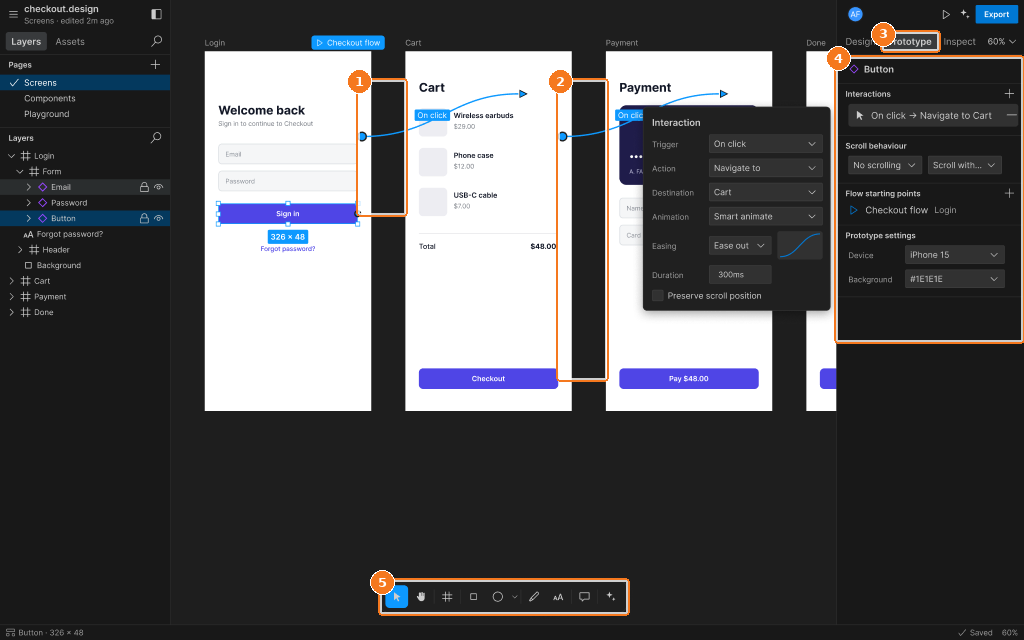
Callouts:
- Noodle Login → Cart (On click)
- Noodle Cart → Payment
- Prototype tab active
- Interaction: trigger, action, destination, transition, easing
- Toolbar