S04 Design tab: text selected
Typography properties of a text layer.
| Purpose | Typography properties of a text layer. |
| SRS | TXT-1..TXT-4, TXT-6, VAR-1 |
| Selection | Text “Welcome back” in Login, text style “Heading/H2” applied |
| Right panel | Selection header (text icon, name). Position. Layout (W/H with sizing: Auto width, Auto height, Fixed; truncation toggle). Appearance. Typography section: style row (style name “Heading/H2” with detach and “##” picker; when no style: font family dropdown 216, then weight dropdown 104 + size field 104), line height field (“Auto”, px, %), letter spacing field, paragraph spacing; alignment segmented (left, centre, right, justified) + vertical alignment segmented (top, middle, bottom); “…” opens Type details popover 264 wide (decoration, case, list style, OpenType features, truncation with max lines, leading trim). Fill, Stroke, Effects, Export. |
| States | Mixed styles in a range (“Mixed” family/size); missing font (font dropdown shows the name in warning with warning icon and “Replace…” link; status strip “! 1 font missing”); text editing on canvas (caret, range highlight, panel edits apply to the range). |
Figma frame S04 (annotated)
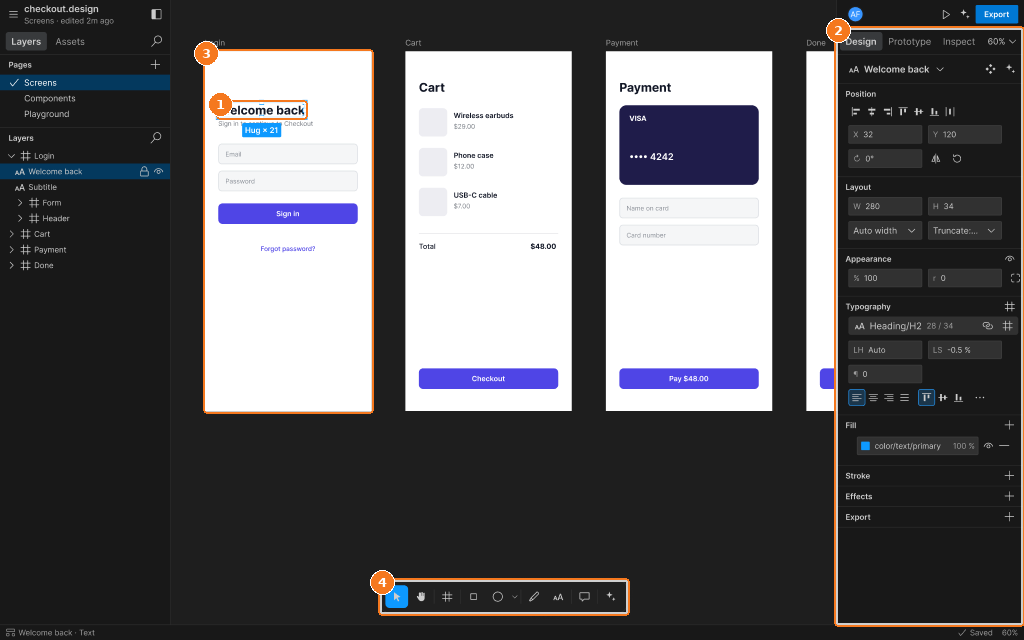
Callouts:
- Text node selected (Hug width)
- Typography section: font, style, size, line height, spacing, alignment
- Login frame
- Toolbar