S06 Variables
Create and edit variables, collections and modes.
| Purpose | Create and edit variables, collections and modes. |
| SRS | VAR-2..VAR-6, VAR-9, VAR-10 |
| Layout | Modal 1040 × 640 (opened from the page properties “Variables” button, or “Open variables” in quick actions; no default shortcut, because Ctrl+Alt+V pastes properties, SRS Appendix B) |
| Regions | Header 48: title “Variables”, search 240, “Import tokens…”, “Export tokens…”, close. Left sidebar 200: collections list (color, spacing, “+ Create collection”), groups under the selected collection (All, bg, fg, border). Table: column “Name” 240 + one column per mode 200 wide (Light, Dark) + “+” column 40 to add a mode. Rows 32: type icon, name, values per mode (swatch + hex, number, alias chip color/neutral/900, string, boolean toggle). Right edit side panel 280 when a variable is selected: name, description, scopes checkboxes (“Show in: Fill, Stroke, Text, Effects…”), code syntax fields (Web --color-bg-surface, iOS, Android), hide from publishing. Footer 40: “+ Create variable” dropdown (Colour, Number, String, Boolean). |
| States | Empty collection; editing a cell (inline field or colour picker popover); alias picker (search list of variables with swatches); default mode marked “Default”; drag rows to reorder; context menu (Duplicate, Delete, Copy code syntax). |
Figma frame S06 (annotated)
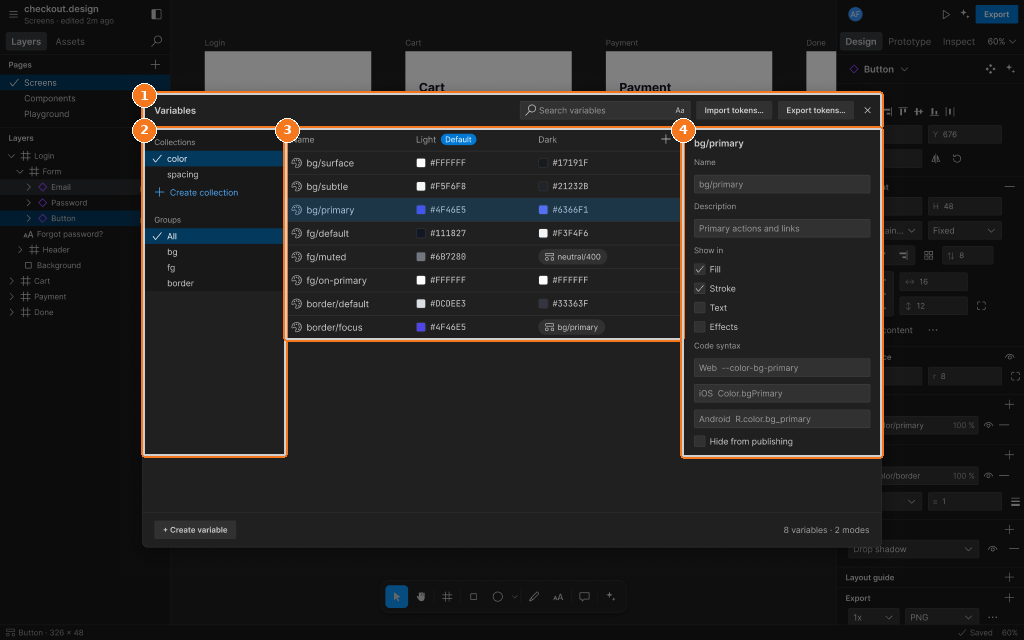
Callouts:
- Variables modal header: collection, modes, search, close
- Collections and groups
- Variable table, one value column per mode
- Edit panel for the selected variable