S10 Inspect (Dev Mode)
What a developer needs to implement a node.
| Purpose | What a developer needs to implement a node. |
| SRS | DEV-1..DEV-8, EXP-7 |
| Mode | Shift+D or tool bar “</>”. Tool bar switches to Inspect tools; canvas shows redlines from the selection to the hovered node; “Ready for dev” status pills (success) on sections. |
| Right panel | Tab “Inspect” active. Header: node name, component name and link to code component (DEV-4), status dropdown (Ready for dev, Completed). Sections: Code (language dropdown: CSS, Tailwind, React, SwiftUI, Compose, Custom element; ud-code-block; “Copy”), Variables and styles (rows: swatch, name, code syntax --color-bg-surface, value), Layout (box model diagram 216 × 120 with margin, padding, size), Typography for text, Assets (export rows), Accessibility (role, name, description — DEV-8), Annotations. Footer: “Generate code…” primary button (DEV-3). |
| States | Nothing selected (list of frames ready for dev); hover redlines with distances; code map missing (“Map to a code component…” link). |
Figma frame S10 (annotated)
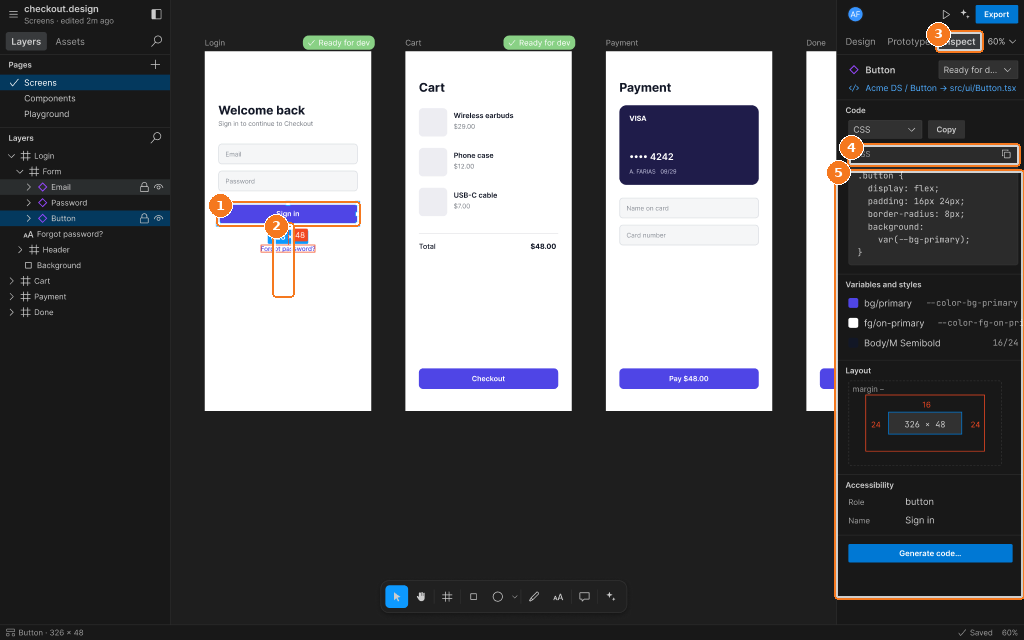
Callouts:
- Selected node
- Redline measurement to the next node
- Inspect tab active
- Code block with language switch
- Variables, box model, accessibility, Generate code