Architecture
Layers and source tree, the command registry and the one write path, rendering, the host and the webview.
A summary of ARC-001.
Layers#
The code is TypeScript in src/, compiled to out/ and bundled to dist/. The five lower layers are webview-safe: they are compiled a second time with tsconfig.webview.json (no Node types), so the same code runs in the VS Code extension host, the ud CLI, the development server and the browser.
| Folder | Holds |
|---|---|
src/core |
The document model: types, ids, events and fold, indexes, commit groups, property resolution (instances, styles, variables, modes), undo inverses, selectors, UDX. |
src/text |
The text engine: HarfBuzz and ICU4X (WebAssembly), font index, bidi, line breaking and layout, identical on every surface. |
src/layout |
Constraints, auto layout (flex and grid), sizing, text auto-resize, incremental relayout. |
src/render |
The display list, the Canvas2D renderer, the SVG and PDF writers, the resvg adapter, tiling, hit testing. |
src/commands |
The command registry: every command definition by category, the run pipeline, schema validation, target resolution, transactions. |
src/plugin-api |
The Figma Plugin API compatibility layer that use_figma scripts run against, in a QuickJS sandbox. |
src/mcp |
The tool table (Figma MCP tools and native ud_* tools), their handlers and the MCP stdio server. |
src/cli, src/headless, src/bridge |
The ud command, a document opened straight from its file, and the socket between ud and a running editor. |
src/host |
controller: the editor host without VS Code (command queue, undo, merging external changes, proposals). vscode: the custom editor, save and backup, settings, status bar, licensing, the AI runner, LM tools. |
media/ |
The webview page: native ES modules and custom elements, no framework and no bundler. |
dev/ |
The development server: the same controller and webview in a browser. |
Layer rules (which folder may import which) are checked by scripts/check-layers.mjs as part of npm run lint.
One write path#
Every change goes through the command registry. The tool bar, the context menus, the Command Palette, ud, use_figma scripts, ud mcp and the AI panel all run the same command definitions (src/commands). Each definition has an id (node.create), a title, a category, a JSON Schema for its parameters, flags (mutates, needs a selection, writes files…) and a run function that produces events. The registry validates parameters, resolves targets, checks the licence gate once for every mutating command, and commits the events as one group, which is one undo step.
The three layers of the CLI follow from that: a Figma MCP tool (layer 1) either reads the core or calls the Plugin API (layer 2), and the Plugin API maps each member to registry commands (layer 3). Nothing writes the document except the registry.
package.json contributions for the commands (titles, the Command Palette) are generated from the registry by scripts/gen-contributions.mjs; npm run compile checks they are current.
The file#
Events are appended to the .design file’s write-append list as one line each; the tree is rewritten only by consolidation. See the file format.
Host, CLI and webview#
- The VS Code host implements a
CustomEditorProviderfor*.design. The document is the source of truth on the host; the webview holds a replica (AppModel) that is updated with every commit and sends commands back. udfinds a running editor through the bridge and runs its commands there, so live edits and CLI edits never overwrite each other; without an editor, it opens the file headless under a lock.- The webview is plain JavaScript custom elements, following the SoftForge page contract: native ES modules, no framework, styles set from code. The canvas renders through the same display list as the CLI’s renderer, so
ud renderand the editor draw the same pixels.
The documentation site#
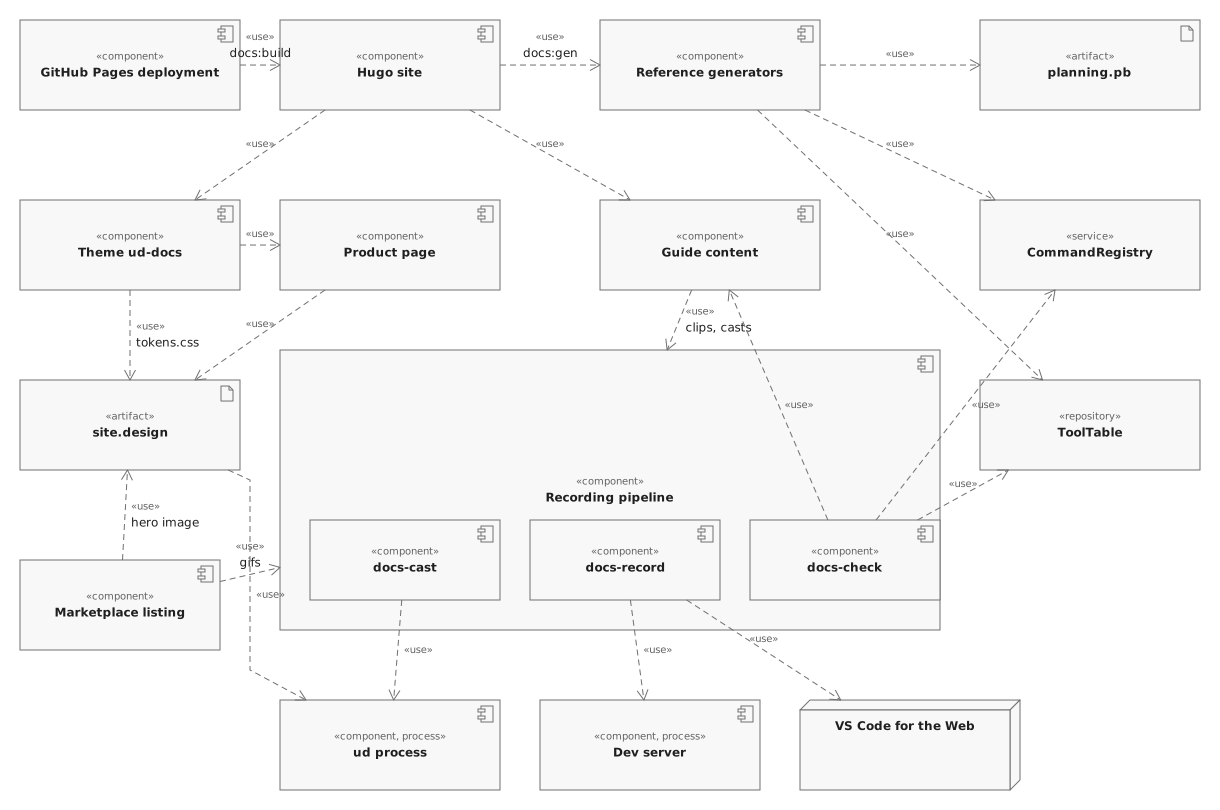
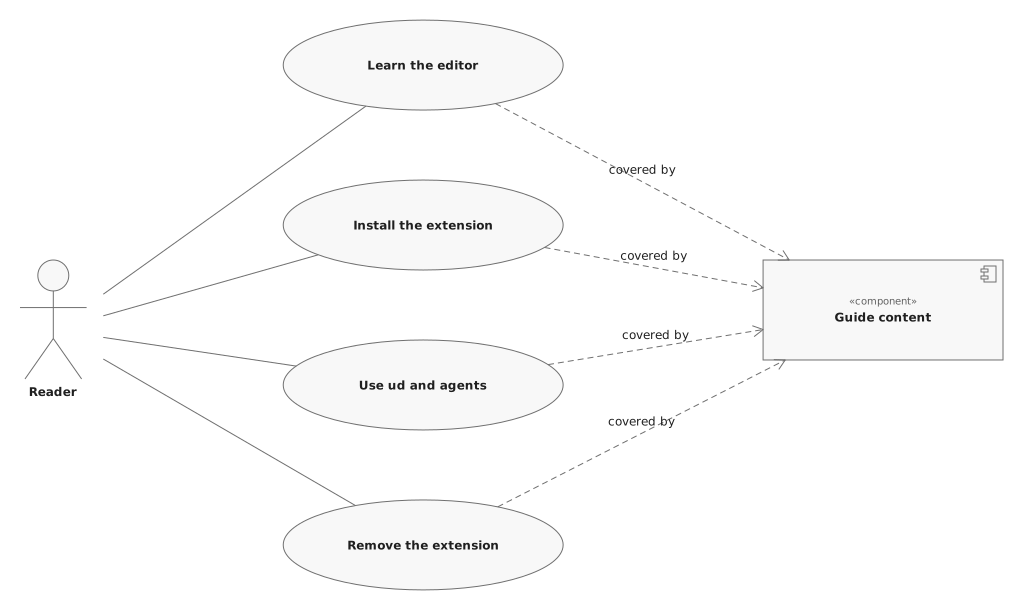
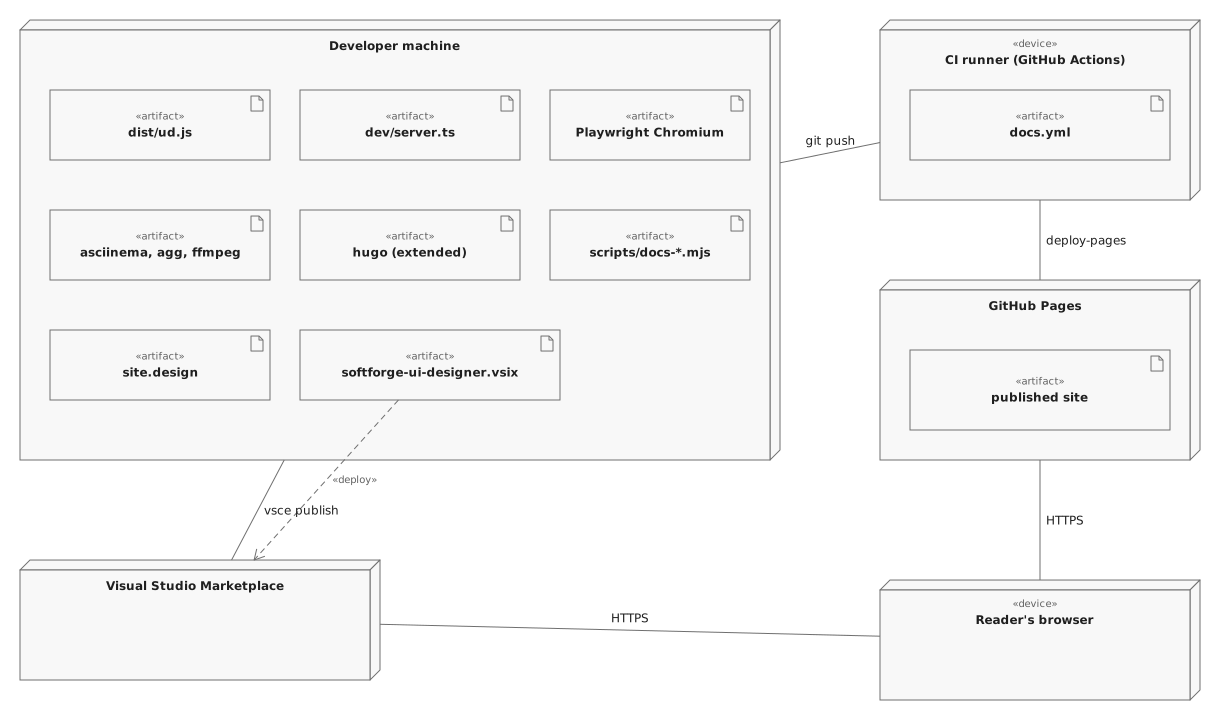
The product page and this documentation are part of the architecture model: the package Documentation and product site of ui-designer.uml (PUB-3) holds the components below, what they use from the extension, the use cases of a reader and the deployment. Arrows point at what is used.
- Hugo site (
docs.src):hugo.toml, the content sections (guide, reference, development, specifications) and two languages, English and Portuguese (Brazil).npm run docs:buildbuilds it intodocs/(PUB-2, PUB-6). - Theme
ud-docs(docs.src/themes/ud-docs): the layouts, the partials (header, sidebar, table of contents, footer, pager), the shortcodesclip,cast,callout,stepsandkeys, and the assets —tokens.cssgenerated from the design’s variables,theme.css,theme.jsand the vendored asciinema player. Light and dark follow the design’s two variable modes (PUB-2). - Product page (the theme’s
layouts/index.html): the landing page, following the page “Product” ofsite.designsection by section (PUB-1). - Guide content (
docs.src/content/guide): the pages in reading order from Install to Uninstalling, each with its clip or cast and the steps as text (PUB-6). - Reference generators:
scripts/docs-specs.mjswrites the specification pages fromplanning.pb;scripts/docs-cli.mjswrites the CLI reference from the command registry and the Figma tool table (npm run docs:gen). site.design(site/site.design): the design source of the product page and the theme, made with UI Designer itself.npm run site:designbuilds it from scratch (scripts/site/build-design.mjsthroughud use_figma --code-file),ud tokens exportwrites its variables intotokens.cssandud renderits images (PUB-1, PUB-2).- Recording pipeline:
docs-recorddrives the dev server (and VS Code for the Web through@vscode/test-web) with Playwright Chromium through scripted scenarios and writes each clip as.webm,.mp4,.gifand a poster (PUB-4);docs-castruns realudandcodecommands underasciinema recand renders a.gifwithagg(PUB-5);docs-checkverifies that every page has its media, every registry command and Figma tool is in the reference, the plan cards matchplans.jsonand both languages list the same pages (PUB-8). - GitHub Pages deployment (
.github/workflows/docs.yml) and the Marketplace listing (the README, thepackage.jsongallery fields, the.vsixfromvsce) publish the result (PUB-7).
The pipeline#
npm run site:designbuildssite/site.design;ud tokens exportwrites the theme’stokens.css.npm run docs:recordandnpm run docs:castrecord the clips and casts intodocs.src/static/clipsanddocs.src/static/casts.npm run docs:genregenerates the specification and CLI reference pages.npm run docs:checkcompares the documentation with the product;npm run docs:buildbuilds the site.- On a push to
master,docs.ymlrepeats the generation and the build on GitHub Actions and deploys to GitHub Pages;vsce publishuploads the.vsixto the Marketplace.
Regenerating the diagrams#
The diagrams are drawn from the model with the Software Board uml command. After changing the package (with uml apply, or in the Software Board editor), render them again:
uml render ui-designer.uml "Documentation and product site" --out docs.src/static/img/uml/site-components.svg
uml render ui-designer.uml "Reading the guide" --out docs.src/static/img/uml/site-use-cases.svg
uml render ui-designer.uml "Site deployment" --out docs.src/static/img/uml/site-deployment.svg
uml validate ui-designer.uml