S13 History and versions
See who changed what; preview, restore and name versions.
Esta página está em inglês; a tradução está a caminho.
| Purpose | See who changed what; preview, restore and name versions. |
| SRS | COL-1, COL-2, CMD-29 |
| Layout | Right panel in History mode (opened from “≡” > “Show version history” or quick actions); width 264. Header 40: “History” title, “Save version…” button, close. |
| Contents | Groups by session (ud-section per session: avatar, actor, “Today 14:02 · 23 changes”). Rows 40: summary “Changed fill of Button”, time tiny. Named versions as rows with a tag icon, title strong, description small muted. Filter dropdown (All, Named versions, by actor). |
| Preview | Selecting a row shows the document at that point read-only: ud-banner “Viewing 14:02 · Claude” with “Restore this version” and “Back to current”. Tools disabled except Move, Hand. |
| Save version dialog | Modal 440: title field, description area, “Save”. |
| States | Loading; long history (virtual list); restoring (as a new change, toast with Undo). |
Figma frame S13 (annotated)
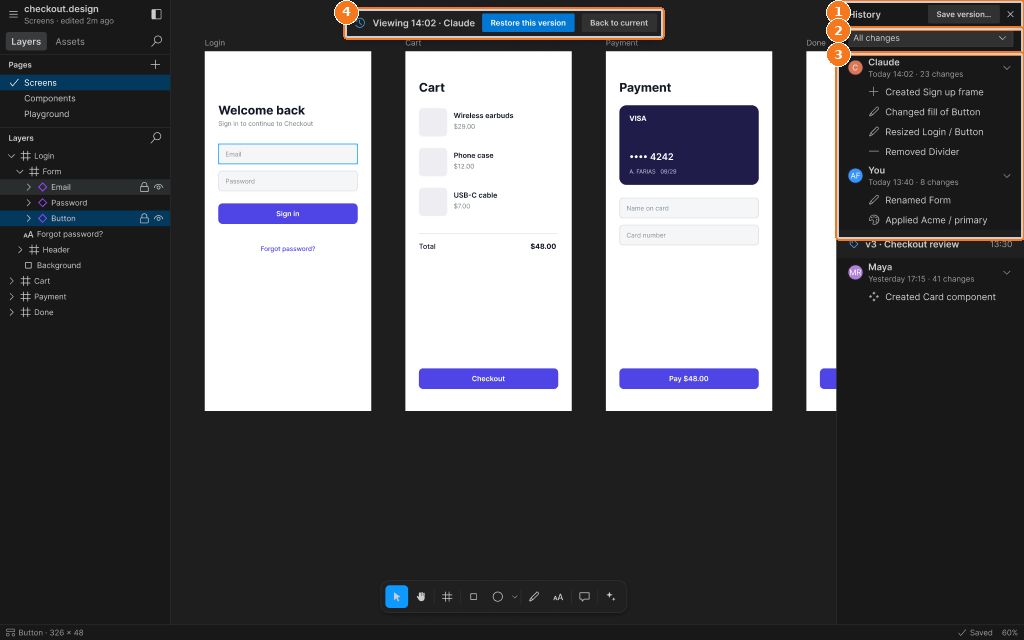
Callouts:
- History header: Save version…, close
- Filter dropdown
- Sessions by actor, change rows, named version
- Viewing a past state: Restore this version / Back to current