Requirements
Every requirement of UI Designer with its priority, type, verification and milestone.
Esta página está em inglês; a tradução está a caminho.
Generated from planning.pb by scripts/docs-specs.mjs. Do not edit by hand: change the requirements on the board and run npm run docs:specs again.
218 requirements, 160 of them Must.
Columns: P priority (MoSCoW), Type functional / non-functional / constraint / interface, Ver. how it is verified, Milestone the release that delivers it.
3. Command parity and the CLI#
See SRS-001 §3 for the chapter text.
3.2 The Figma MCP tool surface#
| ID | Requirement | P | Type | Ver. | Milestone |
|---|---|---|---|---|---|
| CMD-1 | The CLI shall offer the tools of the Figma MCP server under the same names and parameters. ud <tool> --<param> <value> or ud <tool> --json '<arguments>', where <tool> is the Figma MCP tool name (use_figma, get_metadata, …; the kebab-case spelling get-metadata is an alias) and the parameters are its input schema, property for property (fileKey, nodeId, code, description, clientFrameworks, clientLanguages, queries, …). The tool set is in the table below and in CLI-001 §3. |
Must | interface | test | 0.1 |
| CMD-2 | fileKey shall name a local design file. It accepts a path to a .design file (absolute or relative to the workspace), the document id (doc-…) or a ud:// link (ud://<path>.design?node-id=<id>). A figma.com URL is refused with a hint to ud import figma. When only one design is open in the editor, or one .design file is in the folder, fileKey can be left out. |
Must | interface | test | 0.1 |
| CMD-3 | nodeId shall accept the forms that Figma skills produce. Native ids (nd-3f9a0c1e7b2d) and the same id with a colon instead of a hyphen (nd:3f9a0c1e7b2d), because Figma skills turn node-id=1-2 from a URL into 1:2. Also a node-id query parameter in a ud:// link, and a name path (Home/Header/Logo). The figma global’s node.id returns the native id. |
Must | interface | test | 0.1 |
| CMD-4 | Results shall keep the shape of the Figma tool results. get_metadata returns the same sparse XML (layer ids, names, types, positions, sizes), and with no nodeId returns the list of pages; get_design_context returns code (React + Tailwind unless clientFrameworks says otherwise), a screenshot and asset references; get_screenshot returns a PNG as a single-use loopback URL when a server runs, or as a path with url: null from a one-shot headless call (CMD-5), with its size, honouring maxDimension and contentsOnly; get_variable_defs returns name→value pairs. On the terminal, binary results are written to files and their paths printed; --json prints the MCP content array. |
Must | interface | test | 0.1 |
| CMD-5 | Asset and image tools shall keep Figma’s URL protocol, served locally. Where Figma returns short-lived URLs (get_screenshot, download_assets, the assets of get_design_context), ud returns single-use loopback URLs (http://127.0.0.1:<port>/a/<token>) when a server runs: the extension host when bridged, or ud mcp while it runs; the local file path is returned alongside. A one-shot headless call (no bridge, no ud mcp) has nobody to serve a URL, so it returns path with url: null. enableBase64Response inlines the image as in Figma. upload_assets returns single-use loopback URLs that accept a POST of the raw bytes when a server runs; headless it requires the optional paths parameter, which uploads local files in one call. Each image is stored in <name>.design.assets/ as a fill of the matching nodeIds entry or in a new frame; SVG becomes editable vectors. The loopback server is hardened per NFR-4a. |
Must | interface | test | 0.2 |
| CMD-6 | Figma tools that UI Designer cannot serve shall fail clearly. FigJam, Slides, shaders, generative plugins, image generation, video export, html_to_figma (use generate_figma_design or ud import html) and Weave tools are not listed by ud mcp; called through ud, they exit with code 6 (“unsupported”) and a message naming the closest UI Designer alternative. |
Must | interface | test | 0.1 |
| CMD-7 | ud mcp shall serve the same tools over the Model Context Protocol. A stdio MCP server named ui-designer whose tools/list returns the supported Figma tool names with their input schemas, plus the create_design_system_rules prompt. It also has native tools (ud_run, ud_apply, ud_help, ud_tree from 0.1; ud_render from 0.2; ud_system from 0.4; ud_lint from 0.6, with CMD-36), resources for the design-system digest, the Plugin API coverage and the skills (skill://ui-designer/…). Options: --file (default fileKey), --read-only, --allow, --proposal <pp-…> (writes go to a proposal, AI-001 §6.5) and --as (signing actor). ud mcp install adds it to the workspace’s .mcp.json. |
Must | interface | test | 0.1 |
| CMD-8 | Compatibility with the Figma tool schemas shall be tested. The repository keeps a snapshot of the Figma MCP server’s tools/list (test/fixtures/figma-mcp-tools.json). A test fails the build when a supported tool is missing, or renames, drops, retypes or newly requires a parameter. The allowed differences are: (1) extra optional parameters; (2) the pattern of fileKey, widened to accept local paths and document ids (CMD-2); (3) the pattern of every node-id-valued property, including items of arrays (nodeId, nodeIds[], mappings[].nodeId, currentPageId, …), widened to accept native ids (CMD-3); (4) the pattern of planKey, widened to accept ud::local, which whoami keeps returning; (5) fileKey made optional instead of required when ud mcp --file sets a default. Figma’s own forms remain valid input where they can be resolved. The snapshot is refreshed by a script and reviewed like code. |
Must | constraint | test | 0.1 |
| CMD-9 | Agent workflows written for Figma shall work unchanged. The suite covers: build a screen from a description, create a variable collection with modes, build a component set with variants, read a frame and implement it in React. Done when the scenario suite passes against ud mcp, run by Claude Code with Figma’s figma-use, figma-generate-design and figma-generate-library skills and with UI Designer’s own skills (AI-001), under these rules: the Figma skills are pinned copies in test/fixtures/skills/ with their recorded version; the model is named per scenario (the Design tier model of AI-15 for generation scenarios, the Assistant tier for the rest); each scenario runs N = 10 times and passes at ≥ 8/10 with zero tool-schema errors across all runs; Design tier results gate the merge, Assistant tier results are advisory; ids are deterministic under UD_ID_SEED so runs can be replayed; each scenario declares its own --allowedTools; visual checks use numeric render-similarity thresholds (NFR-8); the panel pipeline is tested separately with a mocked claude that replays a recorded stream-json transcript; CI runs the suite with a SoftForge project key kept in CI secrets under a monthly budget set by the owner. |
Must | constraint | test | 0.7 |
3.3 use_figma and the Plugin API#
| ID | Requirement | P | Type | Ver. | Milestone |
|---|---|---|---|---|---|
| CMD-10 | use_figma shall run JavaScript written against the Figma Plugin API. The script gets a figma global and runs with top-level await. Its return value is serialised to JSON as the tool’s result, together with the ids of the nodes it created and changed and its console output. The covered API is listed in CLI-001 §4 and grows with each milestone. 0.1 covers pages, frames, shapes, groups, node properties, getNodeByIdAsync, findAll/findOne. 0.2 adds text and fonts, vectors, booleans, images and exportAsync. 0.3 adds auto layout and constraints. 0.4 adds components, variants, styles, variables and importComponentByKeyAsync from workspace libraries. 0.5 adds reactions. The conveniences that Figma’s figma-use skill relies on are covered at the milestone of what they wrap: node.query, node.set and node.placeholder at 0.1, await node.screenshot() at 0.2, figma.createAutoLayout at 0.3. The optional skillNames parameter is accepted and logged, and errors carry safeToRetryWithoutCanvasRead: true because a failed script changes nothing (CMD-12). |
Must | interface | test | 0.1 |
| CMD-11 | Scripts shall run in a sandbox. A QuickJS interpreter compiled to WebAssembly: no file system, network, require or host objects other than figma, ud and console. Limits on time (default 30 s, --timeout), memory (256 MB) and the number of nodes created (100 000). |
Must | constraint | test | 0.1 |
| CMD-12 | A use_figma call shall be atomic. All changes of one script form one transaction. If the script throws or hits a limit, nothing is applied and the error, with its script line, is returned. If it succeeds, the changes are one undo step and one group of events signed by the actor. description becomes the undo label and the event group’s note. |
Must | functional | test | 0.1 |
| CMD-13 | The Plugin API shall be implemented on the command registry. Every mutating member (setters, create*, remove, appendChild, setBoundVariable, …) runs a registry command; there is no second write path. Scripts can call any registry command directly with ud.run(id, params), read with ud.inspect(node) and insert markup with ud.insertUdx(text, parent). |
Must | constraint | test | 0.1 |
| CMD-14 | API coverage shall be explicit. Using a member that is not implemented throws UnsupportedApiError naming it and the milestone that will add it. ud plugin-api [--json] prints the coverage table. Typings (ud-plugin-api.d.ts), a subset of @figma/plugin-typings plus the ud global, ship with the CLI and the skills. |
Must | interface | test | 0.1 |
| CMD-15 | Figma’s observable behaviour shall be kept where scripts rely on it. Colours are in 0–1. fills, strokes and effects are immutable arrays that must be cloned and reassigned. Text edits need figma.loadFontAsync first, and font style names are Figma’s (“Semi Bold”). figma.setCurrentPageAsync is awaited. figma.mixed is returned for mixed values. Sizing via resize and layoutSizingHorizontal/Vertical. Done when the Plugin API conformance suite (scripts that run in Figma, with recorded results) gives the same trees in UI Designer. |
Must | constraint | test | 0.2 |
| CMD-16 | Scripts shall be runnable from files and from the editor. ud use_figma --code-file <file.js>; in the editor, “Run Script…” runs a .js file of the workspace on the current selection (as figma.currentPage.selection). Scripts in .design-scripts/ appear in the Quick Actions list. |
Should | functional | demonstration | 0.2 |
3.4 The command registry#
| ID | Requirement | P | Type | Ver. | Milestone |
|---|---|---|---|---|---|
| CMD-17 | Every user-visible operation shall be a command in one registry. Each command has a stable id (node.align, text.setFont, component.createSet, export.png), a JSON Schema for its parameters, a result schema, a category, a one-line summary, a long help text with examples, and flags: mutates, needsSelection, ui-only (see CMD-20). |
Must | constraint | inspection | 0.1 |
| CMD-18 | The editor shall invoke commands only through the registry. Toolbar buttons, menus, context menus, keyboard shortcuts, panel fields, canvas gestures (on commit) and the Command Palette all call registry.run(id, params). No webview code mutates the document directly. Done when the webview checker finds no document mutation outside runCommand. |
Must | constraint | test | 0.1 |
| CMD-19 | Every registry command shall be reachable from every agent surface. The CLI reaches each command as ud run <id> [--param value …] or ud <id>. A use_figma script reaches it as ud.run(id, params), and an MCP client through the ud_run tool. A conformance test enumerates the registry and fails the build when a command lacks help text, a CLI test that runs it headless, or a Plugin API mapping or an explicit “registry only” mark. |
Must | constraint | test | 0.1 |
| CMD-20 | Commands that only make sense with a screen shall have a CLI equivalent. A drag becomes node.move --by 10,0; a marquee selection becomes select --query …; zoom to selection becomes view.zoomTo (applies to a live editor, a no-op headless); a colour picker becomes fill.set --color …. The only commands flagged ui-only are pure pointer feedback (hover, cursor) and they shall not change the document. |
Must | constraint | inspection | 0.1 |
| CMD-21 | The registry shall be discoverable. ud commands [--category c] [--json] lists commands; ud help <id|tool> prints parameters, defaults, examples, the Plugin API equivalent and related commands; ud schema <id|tool> prints the JSON Schemas. The same text is the editor’s tooltip and the palette description. |
Must | interface | test | 0.1 |
| CMD-22 | Commands shall be contributed to VS Code. Every non-ui-only command appears in the Command Palette as UI Designer: <Title> when a design editor is active, and can be bound in keybindings.json with its parameters as args. |
Should | interface | test | 0.2 |
| CMD-23 | Command ids, tool names and parameters shall be versioned API. Removing or renaming a registry command or parameter requires a deprecation period of one minor version with an alias; ud commands --json reports since and deprecated. When Figma renames or deprecates a tool, ud keeps the old name as an alias for a minor version. |
Must | constraint | inspection | 0.1 |
3.5 Addressing nodes#
| ID | Requirement | P | Type | Ver. | Milestone |
|---|---|---|---|---|---|
| CMD-24 | Commands shall address nodes by id, path or query. --node nd-3f9a… (id, in either form of CMD-3), --node "Home/Header/Logo" (name path from the page), or --query '<selector>' (CLI-001 §6): type, name glob, component, style, variable binding, text content and ancestry, e.g. frame[name^="Login"] > text:contains("Sign in"). |
Must | interface | test | 0.1 |
| CMD-25 | Commands that act on the selection shall accept a target instead. In a live editor with no target given, the editor’s selection is used (and is figma.currentPage.selection in scripts); headless, a target is required and its absence is an error with a hint. |
Must | functional | test | 0.1 |
| CMD-26 | An agent shall be able to read and set the user’s selection. ud selection prints the selection of the live editor; ud select --query … sets it, so Claude can point at what it is talking about. Assigning figma.currentPage.selection in a script does the same. |
Must | functional | test | 0.1 |
3.6 Running, batching and live editing#
| ID | Requirement | P | Type | Ver. | Milestone |
|---|---|---|---|---|---|
| CMD-27 | The CLI shall edit through the open editor when there is one. Through the local bridge (as pb and uml do): the change appears live, goes through the same queue as the user’s edits, and is one undo step. With no editor open, the file is edited directly under a lock. ud where says which. |
Must | functional | test | 0.1 |
| CMD-28 | Several commands shall run as one transaction. ud apply <file.json|-> takes a list of {command, params}; all succeed or none apply; the result is one undo step and one group of events. Ids created early in the batch can be referenced later as $1, $2 or by a ref name. (A use_figma script is the other way to batch, CMD-12.) |
Must | functional | test | 0.1 |
| CMD-29 | Every change shall be signed. Events carry by: --as, UD_ACTOR, Claude inside Claude Code (CLAUDECODE set), or the git user name. |
Must | functional | test | 0.1 |
| CMD-30 | The CLI shall be safe to retry. --dry-run validates and prints the events without writing; --if-version <hash> (the tree hash of FMT-001 §6.9) refuses if the document moved on; errors are machine-readable (--json) with a code, a message and a hint. Exit codes: 0 ok, 1 command error, 2 usage error, 3 conflict, 4 licence, 5 not found, 6 unsupported. Over MCP the same errors are tool results with isError: true and the code in the text. |
Must | interface | test | 0.1 |
| CMD-31 | The CLI shall be fast enough for agent loops. A read tool answers in under 150 ms through the bridge and under 400 ms headless on a 5 000-node file; a single mutation under 250 ms; use_figma start-up under 50 ms, measured in the process that runs the script (the extension host when bridged, ud mcp while it runs), from the request reaching that process to the first statement of the script running, with a warm sandbox; a one-shot headless ud use_figma, which pays Node start-up, read and fold, is excluded from the 50 ms figure and bound by the 400 ms headless budget instead. |
Must | non-functional | test | 0.2 |
3.7 Seeing and describing designs#
| ID | Requirement | P | Type | Ver. | Milestone |
|---|---|---|---|---|---|
| CMD-32 | ud render shall produce an image of any node. PNG (default), JPG, WebP or SVG of a page, frame, node or region, at a scale, optionally with a variable mode, a variant, or the prototype state after a set of interactions. The image matches the canvas within the NFR-8 tolerance. Raster output larger than 8 192 px on either side is rendered in tiles so that memory stays bounded (NFR-10). get_screenshot is the same renderer behind the Figma tool. This is how an agent sees its work. |
Must | functional | test | 0.2 |
| CMD-33 | ud tree and ud inspect shall describe designs as text. tree prints the layer tree with types, names, ids, sizes and layout in a compact indented form (get_metadata gives the same as XML); inspect prints one node fully (resolved styles, variables, overrides, computed layout) as YAML or JSON. Both have --depth and --fields to stay within an agent’s context budget. |
Must | functional | test | 0.1 |
| CMD-34 | Designs shall round-trip through UDX markup. ud export --format udx writes a node subtree as UDX; ud insert --udx <file|-> builds nodes from it; ud replace swaps a subtree. UDX covers every node property (CLI-001 §7). Done when export→insert of every fixture yields an equal tree up to ids. |
Must | interface | test | 0.2 |
| CMD-35 | ud diff shall compare two versions. Between seqs, named versions, git revisions or files: a structural change list (text, JSON) and a visual diff image (before / after / overlay with changed regions outlined). |
Should | functional | test | 0.5 |
| CMD-36 | ud lint shall check a design against rules. Detached instances, raw colours where a variable exists, text not using a text style, missing auto layout, contrast below WCAG AA, touch targets under 44×44, inconsistent spacing off the spacing scale, unnamed layers. Rules are configurable (.design-lint.json); exit 1 on errors for CI. Must because AI-6 and the 0.7 exit criterion depend on it. |
Must | functional | test | 0.6 |
| CMD-37 | ud watch could stream changes. Prints events as they are applied in the live editor (JSON lines), so an agent can react to the user’s edits. |
Could | interface | test | 0.7 |
4. Product and platform#
See SRS-001 §4 for the chapter text.
| ID | Requirement | P | Type | Ver. | Milestone |
|---|---|---|---|---|---|
| PLT-1 | The extension shall open .design files in a custom editor. CustomEditorProvider (binary-capable, own document) for *.design; double-clicking a file in the Explorer opens the canvas. |
Must | functional | test | 0.1 |
| PLT-2 | A .design file shall hold one design document. Pages, nodes, components, styles, variables, prototype flows, comments and history in one UTF-8 JSON file. Images and fonts the file uses are stored next to it in <name>.design.assets/, addressed by content hash (FMT-001 §8). |
Must | constraint | inspection | 0.1 |
| PLT-3 | The file shall use the tree plus write-append list design of .pb 2.0. Events appended one per line with a leading comma; consolidation folds them into the tree. Envelope, tolerance and identifier rules as in FMT-001. |
Must | constraint | test | 0.1 |
| PLT-4 | The format shall be versioned and published as a JSON Schema. designVersion, $schema URL, migrations for older versions; unknown fields kept, unknown ops skipped with a warning. |
Must | interface | test | 0.1 |
| PLT-5 | Every change shall go through the VS Code document. Undo/redo, save, revert, hot exit, backup and the dirty marker behave as in any editor. A compound change (paste, AI proposal, batch) is one undo step. | Must | functional | test | 0.1 |
| PLT-6 | The user shall be able to open the file as JSON text. “Open as Text” and “Open as Design” in the editor title and Explorer context menu. | Should | functional | demonstration | 0.1 |
| PLT-7 | New designs shall start from templates. “New Design” offers: blank, mobile app (390×844), web (1440×1024), desktop app, design system starter (variables, text styles, base components); written to a chosen folder and opened. Also ud new. |
Must | functional | test | 0.1 |
| PLT-8 | Changes by another process shall merge into the open editor. CLI runs without the bridge, AI runs, git checkouts: new events apply live; the user’s unsaved edits are kept and rebased on top. | Must | functional | test | 0.1 |
| PLT-9 | The extension shall run on VS Code Desktop 1.108+ and compatible forks. Windows, macOS, Linux; no native modules. | Must | constraint | inspection | 0.1 |
| PLT-10 | The editor could run in the web extension host. vscode.dev and github.dev, without the CLI and AI features. | Could | constraint | demonstration | Backlog |
| PLT-11 | A development server shall run the editor in a browser. npm run dev serves the same webview against the same controller, for fast iteration and screenshot tests, as Software Board does. |
Should | constraint | demonstration | 0.1 |
5. Document, pages and layers#
See SRS-001 §5 for the chapter text.
| ID | Requirement | P | Type | Ver. | Milestone |
|---|---|---|---|---|---|
| DOC-1 | A document shall have one or more pages. Add, rename, duplicate, reorder, delete; each page has its own canvas background colour and its own prototype flows. | Must | functional | test | 0.1 |
| DOC-2 | The node types shall cover Figma’s UI design set. Delivered per milestone: 0.1 — Page, Frame, Group, Section, Rectangle, Ellipse, Line, Arrow (a VECTOR with an arrow stroke cap, Appendix D issue 4), Polygon, Star, Slice; 0.2 — Vector, Text, Image (rectangle with image fill); 0.2b — BooleanOperation; 0.4 — Component, ComponentSet, Instance, Slot (CMP-5). FigJam-only types (Connector, StickyNote) are out of scope (§1.2); developer notes are annotations (DEV-7). |
Must | functional | inspection | 0.1 |
| DOC-3 | Nodes shall form a tree with z-order. Each node has one parent and a position among its siblings (fractional index, FMT-001 §4.3); bring forward/backward/to front/to back; nest and unnest by drag or command. | Must | functional | test | 0.1 |
| DOC-4 | Every node shall have common properties. id, name, visible, locked, opacity, blend mode, transform (position, rotation, flip), size, constraints, export settings, prototype interactions, plugin data (key/value), description, and trace references (INT-1). | Must | functional | test | 0.1 |
| DOC-5 | A Layers panel shall show the tree. Type icons, inline rename (double-click, F2), visibility and lock toggles, expand/collapse, drag to reorder and re-parent, multi-select, search by name and type, auto-scroll to the canvas selection, “Collapse all layers”. | Must | functional | test | 0.1 |
| DOC-6 | Layers shall be named automatically and renamable in bulk. Default names by type and content (text nodes take their text); batch rename with find/replace, numbering ($n, $nn), and the current name ($&). |
Should | functional | test | 0.3 |
| DOC-7 | Groups and frames shall be interchangeable. Group selection (Ctrl+G), frame selection (Ctrl+Alt+G), ungroup (Ctrl+Shift+G), “Remove frame”, “Wrap in auto layout” (Shift+A). | Must | functional | test | 0.1 |
| DOC-8 | Sections shall organise the canvas. Large titled regions that hold frames, can be marked “Ready for development”, and move their contents with them. | Should | functional | test | 0.3 |
| DOC-9 | Find and replace shall search the document. Text content, layer names, components, styles and variables across pages; replace text in place. | Should | functional | test | 0.4 |
| DOC-10 | Select matching layers shall exist. Select all with same fill, stroke, effect, font, instance, or same properties; select all layers of the same type inside a selection. | Should | functional | test | 0.3 |
| DOC-11 | We should be able to drag drop and move layers. | 1.2 | |||
| DOC-12 | Layers in the layers panel should have a contextual menu that we can, make basic layer actions like: rename, delete move up down, ident unident. | 1.2 |
6. Canvas and editing#
See SRS-001 §6 for the chapter text.
| ID | Requirement | P | Type | Ver. | Milestone |
|---|---|---|---|---|---|
| CAN-1 | The canvas shall be infinite and zoomable. Zoom 1 % to 25 600 % with Ctrl+wheel, pinch, +/-, Shift+0 (100 %), Shift+1 (fit all), Shift+2 (fit selection); pan with Space+drag, middle button, wheel and trackpad. |
Must | functional | test | 0.1 |
| CAN-2 | Selection shall work as in Figma. Click selects the top-level child of the current context, double-click enters deeper, Ctrl/Cmd+click selects deep, Shift adds, marquee selects, Enter selects children, Shift+Enter the parent, Tab/Shift+Tab next/previous sibling, Esc clears. | Must | functional | test | 0.1 |
| CAN-3 | Nodes shall be moved, resized and rotated directly. Eight handles; Shift keeps aspect ratio; Alt resizes from the centre; rotation handle outside corners with 15° snapping on Shift; arrow keys nudge 1 px, Shift+arrow 10 px (both configurable). | Must | functional | test | 0.1 |
| CAN-4 | Smart guides and measurements shall show while editing. Snapping to edges, centres and equal spacing of siblings; red distance labels; holding Alt over another node shows distances to it. | Must | functional | test | 0.1 |
| CAN-5 | The canvas shall snap to the pixel grid and to layout grids. Pixel grid visible above 400 % zoom; “Snap to pixel grid” on by default; snapping to the frame’s layout grid columns and rows. | Must | functional | test | 0.1 |
| CAN-6 | Align and distribute shall be available. Align left/centre/right/top/middle/bottom, distribute horizontal/vertical spacing, tidy up into a grid; on a single node, align to its parent. | Must | functional | test | 0.1 |
| CAN-7 | Copy, paste and duplicate shall preserve everything. Within and between files and pages; paste here, paste to replace, paste over selection; Ctrl+D duplicates and repeats the last offset; copy/paste properties (Ctrl+Alt+C/V); copy as SVG, PNG, CSS and UDX. Pasting a component instance from another file links its library if available. | Must | functional | test | 0.2 |
| CAN-8 | Rulers and guides shall be available. Shift+R toggles rulers; drag from a ruler to make a guide on a page or frame; guides are stored in the file. | Should | functional | test | 0.3 |
| CAN-9 | Outline mode and pixel preview shall be available. Ctrl+Y shows outlines only; pixel preview renders at 1× / 2× device pixels. | Could | functional | demonstration | 0.5 |
| CAN-10 | A minimap could show the page. Toggleable, bottom right, drag to navigate. | Could | functional | demonstration | 0.5 |
| CAN-11 | Large files shall stay fluid. The canvas budget is NFR-1a (10 000 nodes per page, pan, zoom and drag of 500 nodes at 60 fps on the reference machine with the benchmark fixtures); this row only points there and adds nothing. | Must | non-functional | test | 0.2 |
7. Drawing tools#
See SRS-001 §7 for the chapter text.
| ID | Requirement | P | Type | Ver. | Milestone |
|---|---|---|---|---|---|
| DRW-1 | A toolbar shall offer the drawing tools. Move (V), Scale (K), Frame (F/A), Section (Shift+S), Slice (S), Rectangle (R), Ellipse (O), Line (L), Arrow (Shift+L), Polygon, Star, Image (Ctrl+Shift+K), Pen (P), Pencil (Shift+P), Text (T), Hand (H), Comment (C). | Must | functional | test | 0.1 |
| DRW-2 | Frame presets shall be offered. Phones, tablets, desktop, watch, paper, social media sizes; custom presets in settings; selecting a preset with a frame selected resizes it. | Must | functional | test | 0.1 |
| DRW-3 | Shapes shall have their parametric properties. Rectangle: independent corner radii and corner smoothing (squircle, 0–100 %). Ellipse: arc start, sweep and inner radius (donuts, pies). Polygon: point count. Star: point count and ratio. Line: length, caps. | Must | functional | test | 0.1 |
| DRW-4 | A pen tool shall draw and edit vector networks. Points with straight and Bézier segments, mirrored/asymmetric/disconnected handles, open and closed paths, branching (a point joined to more than two segments), and fill regions toggled per closed area. Enter edits a vector; bend tool (Ctrl), paint bucket for regions. | Must | functional | test | 0.2b |
| DRW-5 | Boolean operations shall be live. Union, subtract, intersect and exclude as a BooleanOperation node whose children stay editable; flatten (Ctrl+E) bakes the result into a vector. | Must | functional | test | 0.2b |
| DRW-6 | Vector utilities shall be provided. Outline stroke (Ctrl+Shift+O), flatten, simplify path, join, reverse direction, offset path. | Should | functional | test | 0.2b |
| DRW-7 | A pencil tool could draw freehand paths. Smoothed into Bézier segments. | Could | functional | demonstration | 0.5 |
| DRW-8 | Masks shall be supported. Use as mask (Ctrl+Alt+M) on the bottom layer of a group: alpha, vector (outline) and luminance masks. | Must | functional | test | 0.2b |
| DRW-9 | Scale tool shall scale proportionally with properties. Scaling with K multiplies stroke weights, effects, radii and font sizes along with size. | Should | functional | test | 0.2 |
8. Fills, strokes, effects and appearance#
See SRS-001 §8 for the chapter text.
| ID | Requirement | P | Type | Ver. | Milestone |
|---|---|---|---|---|---|
| STY-1 | Nodes shall have a list of fills. Solid, linear, radial, angular (conic) and diamond gradients, and image; each with its own opacity, blend mode and visibility; reorderable. | Must | functional | test | 0.2 |
| STY-2 | Gradients shall be edited on the canvas. Drag endpoints and stops on the node; add stops by clicking the line; colour, position and opacity per stop. | Must | functional | test | 0.2 |
| STY-3 | Image fills shall have scale modes and adjustments. Must: fill, fit, crop (with a crop rectangle) and tile (with scale); rotation; exposure and contrast. Should (same milestone, not gating): saturation, temperature, tint, highlights, shadows. | Must | functional | test | 0.2 |
| STY-4 | A colour picker shall cover the needs of UI design. Must: HEX, RGB, HSL, HSB and OKLCH input; opacity; eyedropper (I) over the canvas; document colours; variables and styles in the same picker. Should: a P3 wide-gamut document colour profile as a setting (needs colour management the renderer does not have yet). | Must | functional | test | 0.2 |
| STY-5 | Nodes shall have a list of strokes. Same paint types as fills; weight (per side for frames and rectangles), alignment (inside, centre, outside), dash and gap pattern, caps (none, round, square, arrow lines, arrow equilateral, triangle, circle, diamond), joins (miter, bevel, round) and miter limit. | Must | functional | test | 0.2 |
| STY-6 | Effects shall include shadows and blurs. Drop shadow and inner shadow (x, y, blur, spread, colour, blend mode, “show behind transparent areas”), layer blur and background blur; multiple effects in order. | Must | functional | test | 0.2 |
| STY-7 | Layer opacity and blend modes shall be applied as in Figma. Pass through (groups), normal, darken, multiply, colour burn, lighten, screen, colour dodge, overlay, soft light, hard light, difference, exclusion, hue, saturation, colour, luminosity. | Must | functional | test | 0.2 |
| STY-8 | Frames shall clip content optionally. “Clip content” per frame; clipping respects corner radius. | Must | functional | test | 0.1 |
| STY-9 | Progressive blur and noise/texture effects could be supported. As in current Figma. | Could | functional | demonstration | Backlog |
9. Text#
See SRS-001 §9 for the chapter text.
| ID | Requirement | P | Type | Ver. | Milestone |
|---|---|---|---|---|---|
| TXT-1 | Text nodes shall have three sizing modes. Auto width, auto height and fixed size, with truncation (ellipsis after n lines) for fixed size. | Must | functional | test | 0.2 |
| TXT-2 | Text shall support mixed styles. Any range can have its own font, size, weight, italic, colour (fills), decoration, letter spacing, line height, text case, link, and text style. | Must | functional | test | 0.2 |
| TXT-3 | Paragraph properties shall be supported. Horizontal alignment (left, centre, right, justified), vertical alignment (top, middle, bottom), paragraph spacing, paragraph indent, bulleted and numbered lists with nesting. Should: hanging punctuation and leading trim (cap height to baseline). | Must | functional | test | 0.2 |
| TXT-4 | Typography details shall be available. Line height in px, % or auto; letter spacing in px or %; OpenType features (ligatures, tabular numbers, fractions, small caps, stylistic sets, case-sensitive forms); variable font axes. | Should | functional | test | 0.3 |
| TXT-5 | Text shall be shaped and laid out by one engine everywhere. The same engine (ARC-001 §6) on host, CLI and webview: line breaks and glyph positions are identical across host, CLI and webview on one machine, and across machines when the fonts resolve to bundled, workspace or embedded faces (text that falls back to operating-system fonts may differ between machines). Shaping is HarfBuzz (WASM); line and grapheme segmentation are ICU4X (WASM, pinned data; UAX #14 and UAX #29, with dictionary breaking for Thai and similar scripts); complex scripts (Arabic, Hebrew, Devanagari, Thai, CJK), bidirectional text and emoji are shaped correctly when a face that covers them resolves. | Must | constraint | test | 0.2 |
| TXT-6 | Fonts shall come from known sources. Bundled open fonts (Inter, Roboto, Noto Sans, JetBrains Mono, Source Serif; Latin, Greek and Cyrillic coverage — script and colour-emoji fonts are not bundled in the VSIX and come from the workspace or the operating system), a workspace fonts folder (ud.fonts.folders), the operating system’s installed fonts, and fonts embedded in <name>.design.assets/. A font is embedded only when its OS/2 fsType permits embedding; otherwise the editor warns and keeps a reference by name. A missing font is listed, rendered with a fallback, and can be replaced document-wide. Tests use a pinned font set in test/fixtures/fonts/. |
Must | functional | test | 0.2 |
| TXT-7 | Text shall be edited in place on the canvas. Caret, selection, IME composition, clipboard with rich text, keyboard shortcuts for bold, italic, underline, size and line height. Should: spell check (VS Code locale). | Must | functional | test | 0.2 |
| TXT-8 | Text on a path could be supported. | Could | functional | demonstration | Backlog |
10. Layout#
See SRS-001 §10 for the chapter text.
| ID | Requirement | P | Type | Ver. | Milestone |
|---|---|---|---|---|---|
| LAY-1 | Children of frames shall have constraints. Horizontal: left, right, left and right, centre, scale. Vertical: top, bottom, top and bottom, centre, scale. Resizing a frame applies them; Ctrl held while resizing ignores them. | Must | functional | test | 0.3 |
| LAY-2 | Frames shall have auto layout. Direction horizontal, vertical or wrap; gap between items (fixed or “auto” = space between); row gap for wrap; padding per side; alignment of items (9-point) and baseline alignment for text; reverse z-order (first on top). | Must | functional | test | 0.3 |
| LAY-3 | Sizing shall be fixed, hug or fill. Per axis for frames and children: fixed, hug contents, fill container; min and max width and height. | Must | functional | test | 0.3 |
| LAY-4 | Grid auto layout shall be supported. Rows and columns with fixed, fill (fr) and hug tracks; gaps; children placed by row/column and spanning cells; auto-placement. | Should | functional | test | 0.3 |
| LAY-5 | Children may opt out of auto layout. “Absolute position” keeps a child in the frame with constraints instead of flow. | Must | functional | test | 0.3 |
| LAY-6 | Strokes may be included in layout. “Include stroke in layout” as in Figma (border-box). | Should | functional | test | 0.3 |
| LAY-7 | Auto layout shall be edited directly on the canvas. Drag to reorder items in flow, drag padding and gap handles, Shift+A wraps the selection, suggestions infer direction and gap from existing positions. | Must | functional | test | 0.3 |
| LAY-8 | Frames shall have layout guides. Column, row and uniform grids: count, width or stretch, gutter, margin, alignment, colour; multiple grids per frame; layout grid styles. | Must | functional | test | 0.3 |
| LAY-9 | Layout shall be deterministic and computed by the core. Positions and sizes of auto-layout children are derived, not stored; the same core computes them on host, CLI and webview (ARC-001 §5). | Must | constraint | test | 0.3 |
11. Components and instances#
See SRS-001 §11 for the chapter text.
| ID | Requirement | P | Type | Ver. | Milestone |
|---|---|---|---|---|---|
| CMP-1 | Any selection shall become a component. Ctrl+Alt+K; several selected nodes become several components or one component set (“Create multiple components” / “Combine as variants”). | Must | functional | test | 0.4 |
| CMP-2 | Instances shall follow their main component. Changes to the main component propagate to every instance in the file immediately, except overridden properties. | Must | functional | test | 0.4 |
| CMP-3 | Instances shall accept overrides. Fills, strokes, effects, text content and style, visibility, nested instance swaps, layout sizing within allowed properties; “Reset all overrides” and per-property reset; “Push changes to main component”. | Must | functional | test | 0.4 |
| CMP-4 | Component sets shall have variants. Variant properties with values (e.g. Size=sm|md|lg, State=Default|Hover|Disabled); the instance panel shows a picker per property; switching variant keeps compatible overrides. |
Must | functional | test | 0.4 |
| CMP-5 | Components shall have component properties. Boolean (show/hide a layer), Text (bind a text layer’s content), Instance swap (a nested instance with preferred values), each with a default and a description. Should: Slot (a SLOT node that accepts arbitrary children in an instance, DOC-2). |
Must | functional | test | 0.4 |
| CMP-6 | Instances shall be detachable and swappable. Detach (Ctrl+Alt+B) turns an instance into frames; swap instance keeps overrides where names match; “Go to main component”. | Must | functional | test | 0.4 |
| CMP-7 | An Assets panel shall list components. By page and section, searchable, with thumbnails, drag to insert, descriptions and documentation links. | Must | functional | test | 0.4 |
| CMP-8 | Interactive components shall carry prototype behaviour. Interactions between variants (hover, press, toggle) that every instance plays in prototypes. | Should | functional | test | 0.5 |
| CMP-9 | Components shall have usage reports. Number of instances per file in the workspace, detached copies, and the overrides most used. Also ud components usage. |
Should | functional | test | 0.6 |
12. Styles, variables and libraries#
See SRS-001 §12 for the chapter text.
| ID | Requirement | P | Type | Ver. | Milestone |
|---|---|---|---|---|---|
| VAR-1 | Styles shall be defined and applied. Colour (paint lists), text, effect and layout grid styles with names in groups (Brand/Primary), descriptions, apply/detach, edit in place; a style change updates every user. |
Must | functional | test | 0.4 |
| VAR-2 | Variables shall be organised in collections with modes. Types colour, number, string, boolean; each collection has modes (e.g. Light/Dark, Compact/Comfortable, brands); a value per mode; groups by / in the name; descriptions. |
Must | functional | test | 0.4 |
| VAR-3 | Variables shall alias other variables. A semantic variable (color/bg/surface) refers to a primitive (palette/gray/50); cycles are refused; the panel shows the resolved value per mode. |
Must | functional | test | 0.4 |
| VAR-4 | Properties shall bind to variables. Fills, strokes, opacity, corner radii, width/height/min/max, gap, padding, stroke weight, visibility, text content, font family/size/weight/line height/letter spacing, effect values, component property values. | Must | functional | test | 0.4 |
| VAR-5 | Variables shall have scopes and code syntax. Scopes limit where a variable is offered (e.g. only fills, only gap); code syntax per platform (var(--color-bg), theme.colors.bg) is used by inspection and export. |
Should | functional | test | 0.4 |
| VAR-6 | Frames and pages shall choose modes. Explicit mode per collection on any frame, inherited by its children; preview modes on the canvas and in ud render --mode. |
Must | functional | test | 0.4 |
| VAR-7 | A file shall publish a library to the workspace. Components, styles and variables of a .design file marked as a library are available to other .design files of the workspace (and to files referencing a path or a git-tracked package). Instances keep a reference to the library file and node. |
Must | functional | test | 0.4 |
| VAR-8 | Library updates shall be reviewed before they apply. When a library changes, consuming files show “Updates available” with a visual before/after per component and style; accept all or some; one undo step. Also ud library updates and ud library accept. |
Must | functional | test | 0.4 |
| VAR-9 | Variables shall be importable and exportable as tokens. Must: W3C DTCG JSON and Style Dictionary import and export; export as CSS custom properties, SCSS and Tailwind theme. Should: Tokens Studio JSON, and native formats (Swift, Kotlin/Compose, Flutter). Export is a command and can run on save into a configured path. | Must | interface | test | 0.6 |
| VAR-10 | Expressions in number and string variables could be supported. Arithmetic and string concatenation referencing other variables (spacing/base * 2). |
Could | functional | test | Backlog |
13. Prototyping#
See SRS-001 §13 for the chapter text.
| ID | Requirement | P | Type | Ver. | Milestone |
|---|---|---|---|---|---|
| PRO-1 | A Prototype tab shall define interactions. Triggers: on click, on hover, while hovering, on press, while pressing, on drag, key, mouse enter, mouse leave, mouse down, mouse up, after delay. Should: gamepad triggers. | Must | functional | test | 0.5 |
| PRO-2 | Interactions shall run actions. Navigate to, change to (variant), open overlay, swap overlay, close overlay, back, scroll to, open link, set variable, set variable mode, conditional (if/else on variables), multiple actions in sequence. | Must | functional | test | 0.5 |
| PRO-3 | Transitions shall be animated. Instant, dissolve, smart animate (matching layers by name), move in/out, push, slide in/out; directions; easing (linear, ease in/out, ease in-and-out, back variants, custom cubic Bézier, spring presets and custom spring); duration. | Must | functional | test | 0.5 |
| PRO-4 | Overlays shall be positioned. Centre, top/bottom/left/right, manual, relative to the trigger; close on outside click; background dimming. | Must | functional | test | 0.5 |
| PRO-5 | Frames shall scroll. Overflow none, horizontal, vertical, both; children fixed or sticky while scrolling; scroll position when navigating. | Must | functional | test | 0.5 |
| PRO-6 | Flows shall have starting points. Named flows per page with a starting frame and description; device frame and background per flow. | Must | functional | test | 0.5 |
| PRO-7 | A preview player shall play prototypes. In a VS Code webview panel or an external browser served from localhost; device frames; restart; hotspot hints on misclick; mode switching; follows the editor’s selection when “Preview” is pinned. | Must | functional | demonstration | 0.5 |
| PRO-8 | Prototype connections shall be drawn on the canvas. Noodles from trigger to destination, drag to connect or change destination, flow starting markers. | Must | functional | test | 0.5 |
| PRO-9 | Prototypes could be published as a static site. A folder with HTML, JS and images that plays the flows anywhere (e.g. GitHub Pages). Also ud prototype export. |
Could | functional | demonstration | 0.8 |
| PRO-10 | Prototypes shall be testable headless. ud prototype run --flow <name> --steps 'click:"Sign in";wait:300' renders the resulting screen, so agents can check a flow. Must because the 0.5 exit criterion depends on it. |
Must | functional | test | 0.5 |
14. Inspect, handoff and code#
See SRS-001 §14 for the chapter text.
| ID | Requirement | P | Type | Ver. | Milestone |
|---|---|---|---|---|---|
| DEV-1 | An Inspect mode shall show what developers need. Toggled with Shift+D: measurements between nodes on hover, properties as CSS (and as iOS/Android/Flutter values), variables and styles by name with their code syntax, assets to export, component name and properties. | Must | functional | test | 0.6 |
| DEV-2 | Code snippets shall be generated per node. Must: CSS, HTML + CSS, React (TSX, inline styles or CSS modules), Tailwind classes, custom elements (SoftForge page contract). Should: SwiftUI and Jetpack Compose. Auto layout maps to flex/grid; variables map to their code syntax. | Must | functional | test | 0.6 |
| DEV-3 | Frames shall generate code into the workspace. “Generate Code” writes files for a frame or component in a chosen language to a chosen folder, with a preview diff before writing; regeneration only touches regions between generated markers. Also ud codegen. |
Should | functional | test | 0.6 |
| DEV-4 | Components shall map to code components. A mapping (in the file and in ud.codeMap settings) from a component and its properties to a code component and its props, e.g. Button(Size=sm, Label="Go") → <Button size="sm">Go</Button>; snippets and generated code use it; suggestions come from scanning the workspace (TS/JS exports, custom element registrations). |
Must | functional | test | 0.6 |
| DEV-5 | Status marks shall track handoff. Frames and sections can be “Ready for dev” and “Completed”; changes after “Ready” are highlighted with a compare view. | Should | functional | test | 0.6 |
| DEV-6 | Code shall link back to designs. CodeLens/hover in source files that reference a design node id (@design nd-… comments or code-map entries) shows a thumbnail and “Open in UI Designer”. |
Should | functional | demonstration | 0.6 |
| DEV-7 | Annotations shall be supported. Measurement and note annotations attached to nodes for developers, with categories (behaviour, accessibility, interaction). | Should | functional | test | 0.6 |
| DEV-8 | Accessibility metadata shall be stored per node. Role, accessible name, description, heading level, focus order, alt text for images; used by code generation and checked by lint (CMD-36). | Should | functional | test | 0.6 |
15. Import and export#
See SRS-001 §15 for the chapter text.
| ID | Requirement | P | Type | Ver. | Milestone |
|---|---|---|---|---|---|
| EXP-1 | Nodes shall export as images. PNG, JPG, WebP, SVG and PDF; multiple export settings per node with scale (0.5×–4× or fixed width/height) and suffix; batch export of all export settings on a page; “Export selection” dialog. | Must | functional | test | 0.2 |
| EXP-2 | SVG export shall be clean. Options: outline text, include id attributes, simplify strokes, use absolute bounds; output is minimal and readable. |
Must | functional | test | 0.2 |
| EXP-3 | Pages shall export as multi-page PDF. Frames in order of position or flow, vector text with embedded subset fonts. | Should | functional | test | 0.6 |
| EXP-4 | SVG and images shall import. Drop or paste SVG (to editable vectors, groups, gradients, text where possible), PNG, JPG, WebP, GIF (first frame), AVIF; multiple images placed in a row or as image fills of the selection. | Must | functional | test | 0.2 |
| EXP-5 | Figma files shall import. Through the Figma REST API with a personal access token (stored in SecretStorage) given a file URL (reading .fig files is not in scope for 1.0, Appendix D issue 12). Nodes, components, variants, styles, variables, auto layout, images and prototype links; a report of what was approximated or skipped. Also ud import figma. |
Should | functional | test | 0.8 |
| EXP-6 | HTML pages shall import as designs. A URL or a running local page captured into frames with auto layout inferred from flex/grid, text with fonts, images and SVG; at chosen viewport widths. Uses the Browser DevTools sibling extension when installed, otherwise a headless Chromium found on the machine. Also ud import html. |
Should | functional | test | 0.8 |
| EXP-7 | Copy as code and copy as image shall exist. PNG, SVG, CSS, UDX and code snippets to the clipboard. | Should | functional | demonstration | 0.2 |
| EXP-8 | Penpot and Sketch files could import. | Could | functional | test | Backlog |
16. AI design#
See SRS-001 §16 for the chapter text.
| ID | Requirement | P | Type | Ver. | Milestone |
|---|---|---|---|---|---|
| AI-1 | Claude Code shall be the primary AI backend. Non-interactive claude --print --output-format stream-json with the user’s own account; command and model are settings (ud.ai.claude.command, ud.ai.models.*). Same integration as Project Board and Software Board. |
Must | interface | test | 0.7 |
| AI-2 | The extension shall install Claude Code skills for design. “Let Claude Code Design in This Folder” writes skills under .claude/skills/ (AI-001 §3): ui-designer (the ud CLI, UDX, the design loop), ui-designer-design-system, ui-designer-from-code, ui-designer-to-code and ui-designer-review. Skills are versioned and updated on extension update with a diff prompt if edited locally. |
Must | interface | demonstration | 0.1 |
| AI-3 | The design system shall be summarised for agents. ud system prints a compact digest of the file and its libraries: variables with modes, styles, components with properties and descriptions, spacing and type scales, usage guidelines from descriptions. Skills load it first so agents use the system instead of raw values. |
Must | functional | test | 0.4 |
| AI-4 | An AI panel shall design with the user. Prompt with the selection as context, attach images (screenshots, sketches) and files; Claude works through ud on the live editor; each turn’s changes form one undo step and are highlighted; follow-up turns refine. |
Must | functional | demonstration | 0.7 |
| AI-5 | AI panel changes shall be reviewable before they are kept. Scope: the AI panel (AI-4) and quick actions (AI-10). By default a panel turn runs on a scratch branch of the document (a proposal); the panel shows a visual before/after and a change list; Accept applies as one undo step, Discard drops it. “Apply directly” is a setting. External agents (Claude Code in a terminal, other MCP clients, LM tools) write to the live document or to disk and are not covered; they can opt in with ud mcp install --proposal auto, which gives each session one proposal that is accepted or discarded in the panel. |
Must | functional | test | 0.7 |
| AI-6 | AI shall generate screens from a description. Text (and optionally a reference image or a .pb requirement) to one or more frames built from the design system’s components and variables, laid out with auto layout, named, and checked with ud lint and ud render before returning. |
Must | functional | demonstration | 0.7 |
| AI-7 | AI shall create designs from code. From a component file, route or running page, propose frames that match the implementation using the design system (with EXP-6 when a page is running). | Should | functional | demonstration | 0.7 |
| AI-8 | AI shall implement designs as code. “Implement with Claude” turns a frame or component into code in the workspace using the code map (DEV-4), project conventions (CLAUDE.md) and generated snippets; changes shown as a diff before applying. | Should | functional | demonstration | 0.7 |
| AI-9 | AI shall review designs. Consistency with the design system, accessibility, hierarchy, spacing, copy; findings as comments pinned to nodes with optional fix proposals. | Should | functional | demonstration | 0.7 |
| AI-10 | Quick AI actions shall exist. Rename layers, fill with realistic content, translate text, generate variants of a component (states, sizes), suggest auto layout, write component descriptions, generate alt text. | Should | functional | demonstration | 0.7 |
| AI-11 | AI features shall use the same MCP server as external agents. The AI panel runs Claude Code with ud mcp (CMD-7) attached, so the editor’s AI and a user’s own Claude Code session call the same Figma-named tools and the same skills. |
Must | interface | test | 0.7 |
| AI-12 | The extension shall contribute language model tools. The Figma-named tools of CMD-1 (use_figma, get_metadata, get_screenshot, get_design_context, get_variable_defs, search_design_system) registered through vscode.lm.registerTool for Copilot agent mode and other VS Code chat agents; the VS Code Language Model API (vscode.lm) is an alternative backend for the AI panel. |
Should | interface | test | 0.7 |
| AI-13 | AI shall be optional and use the user’s accounts. ud.ai.enabled turns every AI surface off; no keys of SoftForge; no design data sent to SoftForge servers. |
Must | constraint | inspection | 0.7 |
| AI-14 | AI runs shall be bounded and cancellable. Streamed progress, Cancel, time and step limits; a failed or cancelled run is rolled back as one undo step (with “Apply directly”) or its proposal is dropped (default). Tools allowed to the agent: ud and read-only workspace tools (Read, Grep, Glob); writing code only in AI-8 after review. |
Must | constraint | test | 0.7 |
| AI-15 | Models shall be routed by tier. Design (generation, from code, implement): opus. Assistant (chat, edits of the selection): sonnet. Quick (rename, content, alt text): haiku. Each a setting; aliases follow new releases. |
Should | constraint | inspection | 0.7 |
17. History, versions and comments#
See SRS-001 §17 for the chapter text.
| ID | Requirement | P | Type | Ver. | Milestone |
|---|---|---|---|---|---|
| COL-1 | A history panel shall list changes. From the WAL: who, when, what, grouped by session; preview the document at any point; restore a point as a new change. | Must | functional | test | 0.3 |
| COL-2 | Named versions shall be saved. “Save to version history” with a title and description; listed in history and in ud versions; consolidation keeps them. |
Must | functional | test | 0.3 |
| COL-3 | Comments shall be pinned to the canvas. Threads anchored to a node or a point, with mentions of git authors, reactions, resolve/reopen; stored in the file; listed in a panel; ud comments. |
Should | functional | test | 0.6 |
| COL-4 | Two branches shall merge. git union merge of the WAL (*.design merge=union in .gitattributes, offered by the extension); concurrent edits of different properties both survive; the same property resolves last-in-file wins and is reported. |
Must | functional | test | 0.1 |
| COL-5 | Branch compare shall be visual. “Compare with branch/revision” shows changed frames side by side with an overlay (CMD-35). | Should | functional | demonstration | 0.6 |
| COL-6 | Live co-editing could be offered through VS Code Live Share. The host’s editor is the single writer; guests send commands over a Live Share service and see cursors and selections. | Could | functional | demonstration | Backlog |
18. Integrations#
See SRS-001 §18 for the chapter text.
| ID | Requirement | P | Type | Ver. | Milestone |
|---|---|---|---|---|---|
| INT-1 | Nodes shall trace to Project Board items. Pick REQ-n or #n from .pb boards of the workspace; trace chips show title and state; .pb items show linked frames with thumbnails when Project Board is installed. |
Should | functional | test | 0.6 |
| INT-2 | Frames could be generated from a requirement. “Design in UI Designer” on a .pb requirement opens an AI proposal seeded by it (AI-6). |
Could | functional | demonstration | 0.8 |
| INT-3 | Running pages shall be compared with designs. With Browser DevTools installed, overlay a frame on a live page at the same viewport with opacity and difference blend, and list mismatched spacing, colours and fonts. | Should | functional | demonstration | 0.8 |
| INT-4 | Software Board components could link to UI frames. A UML component or class can trace to frames that realise its UI. | Could | functional | demonstration | Backlog |
19. Subscription and licensing#
See SRS-001 §19 for the chapter text.
| ID | Requirement | P | Type | Ver. | Milestone |
|---|---|---|---|---|---|
| LIC-1 | The extension shall be sold under the SoftForge subscription model. Proprietary licence; product “UI Designer” on the Soft Forge Payments server, key prefix UD; plans Pro, Pro yearly and Team in plans.json. |
Must | constraint | inspection | 1.0 |
| LIC-2 | A trial, a Free plan and paid plans shall gate editing. 30-minute trial with everything. Free: open, view, inspect, comment, export images and tokens, every read tool and read command of ud and ud mcp (including get_design_context, get_screenshot and ud render). Paid: editing (UI and CLI mutations, which gates ud mcp and the language model tools exactly as it gates ud), code generation into the workspace (DEV-3), AI features, library publishing. “AI features” means the AI panel (AI-4) and the quick actions (AI-10) only; an external agent using ud or ud mcp is gated by the mutation rule, nothing else. |
Must | functional | test | 1.0 |
| LIC-3 | Users shall sign in through the platform or paste a licence key. Browser sign-in with a matching code and machine-bound session keys, or a pasted key; the vendored licensing client. | Must | functional | test | 1.0 |
| LIC-4 | Licensing shall work offline within a grace period. Offline signature checks; a server call about once a day. | Must | functional | test | 1.0 |
| LIC-5 | Reading shall never be gated. Opening, viewing, rendering, exporting and saving an edit already made always work, and so do all read tools of ud, ud mcp and the language model tools (get_metadata, get_screenshot, get_design_context, get_variable_defs, search_design_system, get_libraries, whoami, ud tree/inspect/render/system); a refused CLI or MCP mutation exits with code 4 (or isError with the code, CMD-30) and a message saying how to unlock it. |
Must | functional | test | 1.0 |
| LIC-6 | The subscription shall be visible and manageable. Settings section, status bar item, and commands: sign in, sign out, plans, manage, activate, refresh, deactivate. | Must | functional | demonstration | 1.0 |
| LIC-7 | The licence gate shall exist from the first release. A licence-provider interface in the core with an “always paid” stub implementation at 0.1; the command registry checks the provider before every command flagged mutates (one gate, no second check in the UI or CLI); exit code 4 and whoami’s plans and seat are wired to the provider. The real provider (LIC-1, LIC-3, LIC-4) replaces the stub at 1.0 without touching the gate. |
Must | constraint | test | 0.1 |
| LIC-8 | The licensing interaction is given by two pop ups. It shouldn’t be this way. A drop down action pane should appear like Browser DevTools licensing. If out of license, every panel view including the canvas should be blured. The modal menu for browser devtools: 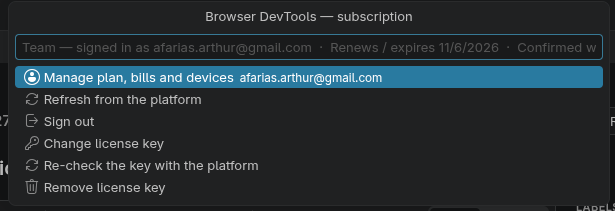 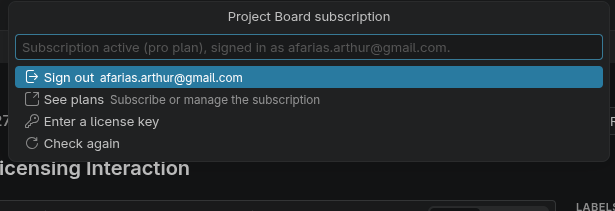 |
0.0 |
20. User interface#
See SRS-001 §20 for the chapter text.
| ID | Requirement | P | Type | Ver. | Milestone |
|---|---|---|---|---|---|
| UI-1 | The layout shall follow Figma adapted to VS Code. Toolbar at the bottom centre of the canvas (as Figma UI3); left panel with Pages, Layers and Assets; right panel with Design, Prototype and Inspect tabs; canvas in the centre; zoom and mode controls top right. Panels collapse (Ctrl+\) and resize. | Must | functional | demonstration | 0.1 |
| UI-2 | Chrome colours and fonts shall come from the VS Code theme. themeColor(token) and themeFont(role); dark, light and high contrast themes work; the canvas background is a document property. |
Must | constraint | inspection | 0.1 |
| UI-3 | The webview shall follow the SoftForge page contract. Custom elements, no framework, no bundler, no stylesheets, codicons, checked by npm run check:webview. |
Must | constraint | inspection | 0.1 |
| UI-4 | Everything shall be operable from the keyboard and assistive technology. Accessible names, visible focus, every canvas node reachable through the Layers panel, shortcuts listed in a Keyboard Shortcuts panel (Ctrl+Shift+?). | Must | non-functional | test | 1.0 |
| UI-5 | Panel fields shall accept expressions and units. Numeric fields accept arithmetic (120/3, +8), units (px, %), scrubbing by dragging the label, Shift for ×10, and mixed values on multi-selection. |
Must | functional | test | 0.1 |
| UI-6 | Quick actions shall find any command. Ctrl+/ opens a searchable list of every registry command, component and style insertable by name. | Must | functional | test | 0.2 |
| UI-7 | The UI shall show what an agent is doing. When ud changes the live document, the changed nodes flash with the actor’s colour and name, and a status item shows the running agent with a Stop button that rejects its further commands. |
Must | functional | demonstration | 0.2 |
| UI-8 | The layer panel currently just support showing the layers structure, but we need something more interactive. We should be able to copy, paste, drag and drop, delete and create layers. The requirements below details every one of the aspect to design a solution. | 1.2 | |||
| UI-9 | The context menu from the canvas should have a creational functionality, that is, we should create a context menu that can have the same elements from the bottom toolbox. | 1.2 | |||
| UI-10 | When creating a rectangle element or other, you should drop exactly to the first properties item so the user could navigate the properties of the element being inserted in the canvas, to accelerate the design process. | 1.2 |
21. Non-functional requirements#
See SRS-001 §21 for the chapter text.
| ID | Requirement | P | Type | Ver. | Milestone |
|---|---|---|---|---|---|
A page with 10 000 nodes shall stay fluid. On the reference machine (a 2023 mid-range laptop: 4 performance cores, 16 GB RAM, integrated GPU, 1440p display) with the benchmark fixtures in test/fixtures/bench/: a page with 10 000 nodes and 200 images pans and zooms at 60 fps, drags a selection of 500 nodes at 60 fps, and single-node edits commit in under 16 ms of main-thread time. CAN-11 points here. |
Must | non-functional | test | 0.2 | |
| NFR-2 | Files shall merge in git. Changes to different nodes or properties on two branches merge without conflict (COL-4). | Must | non-functional | test | 0.1 |
| NFR-3 | Files shall stay small. No binary data in the .design file; a 10 000-node file is under 15 MB after consolidation; images deduplicated by hash. |
Must | non-functional | test | 0.2 |
| NFR-4 | The extension shall be secure by default. Strict CSP, no remote code, licence and API tokens in SecretStorage, AI runs sandboxed (AI-14). The parts that ship earlier are NFR-4a and NFR-4b. | Must | non-functional | inspection | 1.0 |
| NFR-5 | The code shall be tested in CI on three platforms. Unit tests for the core (events, layout, text, render, commands), CLI and Figma MCP schema conformance (CMD-8, CMD-19), Plugin API conformance (CMD-15), golden-image render tests, webview checker, integration tests in VS Code; Linux, Windows, macOS. | Must | non-functional | inspection | 0.1 |
| NFR-6 | The editor shall recover from errors. A malformed file opens with the readable part and a warning (FMT-001 §9); a render error in one node shows a placeholder for that node only; crashes of the webview reload it without losing unsaved state. | Must | non-functional | test | 0.2 |
| NFR-7 | Strings could be localizable. English only for 1.0. | Could | non-functional | inspection | Backlog |
| NFR-8 | Rendering shall agree across surfaces within a stated tolerance. The resvg output of ud render (the RasterRenderer) is the reference. The Canvas2DRenderer with GPU rasterisation off, PNG exports and get_screenshot differ from it by less than 0.5 % of pixels with a per-pixel tolerance of 2/255, and 8/255 inside the bounds of blur and shadow effects, on the golden set. PDF and SVG exports are compared after rasterising them with resvg; JPG and WebP are excluded (lossy). The GPU-accelerated canvas gets a smoke tolerance only (no pixel contract). The preview player joins the contract at 0.5. Conic and diamond gradients use one shared raster tile on both renderers; the SVG writer sets color-interpolation-filters="sRGB" so filters match Canvas. Decided in Appendix D issue 3 and an ARC-001 ADR. |
Must | non-functional | test | 0.2 |
| NFR-9 | The extension shall have a documentation site. Specifications, user guide, CLI reference generated from the registry, file format and JSON Schema; Hugo site styled like the sibling products, served by GitHub Pages. | Should | non-functional | inspection | 1.0 |
| A file with 50 000 nodes shall open and edit within budget. Same machine and fixtures: a 50 000-node file opens in under 2 s, and the NFR-1a page budgets hold with the whole file loaded. | Must | non-functional | test | 1.0 | |
The bridge and the loopback asset server shall be hardened. Bridge sockets readable only by the user, with a random token; the asset server of CMD-5 binds 127.0.0.1 only, accepts a request only when its Host header matches the bound address and port, rejects any request that carries an Origin header (no browser page may fetch it), caps uploads at 10 MB, and hands out 128-bit single-use tokens that expire after 10 minutes. |
Must | non-functional | test | 0.1 | |
Imported SVG shall be sanitised. No scripts, no event handlers, no external references (images, fonts, stylesheets, use across documents) survive import (EXP-4, upload_assets). |
Must | non-functional | test | 0.2 | |
| NFR-10 | Memory shall stay within budget. With the 50 000-node benchmark file open on the reference machine (NFR-1a): the extension host plus its workers (script sandbox, render) use at most 1.5 GB, and one webview at most 1 GB, including tile and glyph caches. Raster output above 8 192 px on a side is tiled (CMD-32) so that no single pixmap exceeds the budget. | Must | non-functional | test | 1.0 |
| NFR-11 | The package shall stay small. The VSIX is at most 25 MB; CI fails the build when a packaged VSIX exceeds it. Script and emoji fonts are not bundled (TXT-6). | Must | non-functional | test | 0.2 |
22. Publishing and documentation#
The product page, the documentation site and its recordings, the Marketplace listing and the release checklist (milestone 1.3 Publishing).
See SRS-001 §22 for the chapter text.
| ID | Requirement | P | Type | Ver. | Milestone |
|---|---|---|---|---|---|
| PUB-1 | The product page shall be designed in UI Designer itself. site/site.design holds the page “Product” with the frames Product/Desktop (1440) and Product/Mobile (390), built from scratch by npm run site:design (scripts/site/*.js run through ud use_figma --code-file, so the design is reproducible), with the site’s variables (collection site, modes Light and Dark) and components; the Hugo landing layout follows the design (tokens exported with ud tokens export into the theme’s CSS variables, section markup from ud snippet --language html), and the page’s images are rendered from the design (ud render). Sections: header, hero with the editor clip, three pillars (Design · Build · Direct agents), workflow strip with clip cards, “Made for agents” with a cast, interop row, plans from plans.json, install band with the install command, footer with the language switch. |
Must | functional | demonstration | 1.3 |
| PUB-2 | The documentation theme shall be designed in UI Designer itself. The page “Docs” of site/site.design holds Docs/Desktop (1440) and Docs/Mobile (390) and the components Clip, Cast, Callout, Step list, Code block, Pager, Sidebar group and TOC; the Hugo theme docs.src/themes/ud-docs (layouts, partials, shortcodes clip, cast, callout, steps, assets) follows it, its CSS variables come from the design’s tokens, light and dark modes follow the two variable modes, and the theme is modelled in the UML (PUB-3). |
Must | functional | demonstration | 1.3 |
| PUB-3 | The documentation and product site shall be part of the architecture model. ui-designer.uml gains the package “Documentation and product site”: components (Hugo site, theme ud-docs, content sections, the site.design source, the recording pipeline docs-record/docs-cast, the generators docs-specs/docs-cli, GitHub Pages deployment), their dependencies on the extension (dev server, ud, registry), a deployment diagram, the use cases “Learn the editor”, “Install”, “Remove”, and traces to PUB-1 to PUB-8; rendered as a diagram in the development guide. |
Must | constraint | inspection | 1.3 |
| PUB-4 | Every guide topic about the editor shall be shown as a short recorded clip. npm run docs:record (scripts/docs-record.mjs) drives the dev server with Playwright (Chromium, 1280×800, dark theme, the sample or a scenario fixture) through scripted scenarios in scripts/docs/scenarios/*.mjs and writes docs.src/static/clips/<name>.webm (≤ 20 s), an .mp4, a poster .png and a .gif for the Marketplace README; the guide embeds them with the clip shortcode (video with poster, caption, the steps as text for readers and screen readers). Scenarios cover: new design, shapes, frames and layers, text, fills/strokes/effects, auto layout, components and instances, variables and modes, prototyping and the player, inspect and snippets, codegen, comments, AI panel (mock), HTML and Sketch import, licence menu, shortcuts panel, layers drag and drop, canvas menu, multiplayer cursors, vscode.dev (VS Code for the Web through @vscode/test-web), the Extensions view for uninstall. |
Must | functional | test | 1.3 |
| PUB-5 | Every command-line usage in the guide shall be an asciinema recording. npm run docs:cast (scripts/docs-cast.mjs) runs real ud and code commands in a scratch folder under asciinema rec (v2 casts, typed with realistic timing, 100×30) into docs.src/static/casts/<name>.cast and renders a .gif with agg as the poster and the Marketplace fallback; the guide embeds them with the cast shortcode (asciinema-player vendored into the theme, idle-time limit 2 s, the command list as text). Casts cover: install from the VSIX and from the Marketplace command, ud --version/where/tree/get_metadata, use_figma with a script, import html/sketch/penpot, lint and fix, tokens export, snippet and codegen, prototype headless run, history and versions, ud diff, licence status/activate/deactivate, ud mcp tools/list, Claude Code skills install, uninstall and clean-up. |
Must | functional | test | 1.3 |
| PUB-6 | The user guide shall take a reader from installing to removing the extension, each step shown. Pages in reading order: Install (Marketplace, VSIX, vscode.dev, first run and the trial), A 5-minute tour, First design, Tools, Panels, Layout, components and variables, Prototyping, Handoff, AI, Importing (Figma, HTML, Sketch, Penpot), Licensing, Keyboard and accessibility, Designing together, Command line and agents, UI Designer on the web, Troubleshooting, Uninstalling (deactivate the licence, remove the ud shim and skills, uninstall, what stays and what to delete). Every page has a one-line intro, “What you need”, the clip or cast, the steps as text, and links to the reference; the sidebar follows the order; the Marketplace README mirrors the tour with gifs. |
Must | functional | inspection | 1.3 |
| PUB-7 | The extension shall be ready to publish on the Marketplace. README as the listing (hero image rendered from the design, gifs of the tour, feature table, install, licensing, links), package.json gallery banner, categories, keywords, icon, repository, homepage, bugs, qna; npm run package produces the .vsix and vsce ls shows l10n, fonts, wasm, media/dist and no tests, sources or sample files beyond the templates (.vscodeignore reviewed); CHANGELOG 1.2.0 finalised as the release notes with the date; npm run docs:build clean and deployed by docs.yml; a release checklist page in the development guide (version bump, changelog, package, test on both hosts, publish with vsce publish, tag, docs deploy, announce). |
Must | constraint | inspection | 1.3 |
| PUB-8 | The documentation shall be checked against the product in CI. npm run docs:check (scripts/docs-check.mjs): every guide page has at least one clip or cast, every clip/cast referenced by a shortcode exists with its poster, every scenario and cast script still runs (recorded fresh in CI on a schedule and on release, compared by frame count and duration ±20 %), every registry command and Figma tool appears in the CLI reference, every ud.* command of package.json is mentioned in the guide or the reference, the product page’s plan cards match plans.json, and the two locales’ guides list the same pages; run by npm run lint’s CI job. |
Must | non-functional | test | 1.3 |
| DES-1 | The UI-001 design shall live in the repository as a UI Designer document. The Figma file (figma.com/design/kkYWepMrew5dUaj3nixcn1) is imported with ud import figma (EXP-5; the owner’s Figma token, or the Figma connector’s metadata and screenshots rebuilt through use_figma scripts) into design/ui-designer.design: pages Foundations (the Theme, ud and size collections with their modes, text styles), Components, Screens (S01–S19), Flows; the import report kept next to it; later changes made in UI Designer, the Figma file becoming the archive. |
Must | functional | demonstration | 1.4 |
| DES-2 | The UI design requirements shall carry screenshots rendered from the repository’s design. ud render of every screen frame of design/ui-designer.design replaces or joins the Figma screenshots attached to UI-001 §5 (#6) and the UI requirement issues, with a comment per screen describing the design decisions (layout, tokens, components, states) and the differences from the implemented editor; new UI requirements are created where the implemented editor diverged from the Figma design (side panes as views, the licence card, the layer and canvas menus, the creational focus) so the board documents the design process end to end. |
Must | functional | inspection | 1.4 |