S03 Design tab: auto layout frame
Full Design tab for a frame with auto layout; the densest panel.
Esta página está em inglês; a tradução está a caminho.
| Purpose | Full Design tab for a frame with auto layout; the densest panel. |
| SRS | LAY-1..LAY-8, STY-1, STY-5, STY-6, STY-7, STY-8, VAR-4, EXP-1, UI-5 |
| Selection | Frame “Card” (vertical auto layout, padding 24, gap 16, radius 12, fill bound to color/surface) |
Right panel, top to bottom (y relative to the panel top; the panel scrolls 18 px at 900):
text
+---------------------------------+
| Design  Prototype  Inspect 100%v|   y 40   tabs 36
|---------------------------------|
| [#] Card  v       [<>] [K]  [AI]|   y 76   selection header 40
|---------------------------------|
| Position                        |   y 116  section 132
| [|< +|  >|] [T+ -+ _|]  [=||=]  |          align (6) and distribute
| [X     24 ] [Y    120 ]         |
| [R     0d ] [<> flip ^v]        |          rotation, flip H/V
|---------------------------------|
| Auto layout                 [-] |   y 248  section 204
| [W 326  Fixedv] [H 212  Hug v]  |          sizing per axis (LAY-3)
| [ v  >  wrap grid] [=| gap 16 ] |          direction, gap
| .-------.      [<> pad  24 ]    |          alignment matrix 64 x 64
| | . . . |      [^v pad  24 ] [o]|          padding H/V, independent
| | . * . |                       |
| '-------'                       |
| [x] Clip content          [...] |          more: strokes in layout, canvas stacking, baseline
|---------------------------------|
| Appearance           [eye] [bl] |   y 452  section 68  visibility, blend
| [%     100 ] [r       12 ] [o]  |          opacity, corner radius, independent corners
|---------------------------------|
| Fill                  [::] [+]  |   y 520  section 68
| [##] color/surface   [ 100%] e -|
|---------------------------------|
| Stroke                [::] [+]  |   y 588  section 100
| [##] color/border    [ 100%] e -|
| [Inside   v] [=  1     ] [o]    |          position, weight, sides
|---------------------------------|
| Effects               [::] [+]  |   y 688  section 68
| [*] Drop shadow       [v] e -   |
|---------------------------------|
| Layout guide               [+]  |   y 756  section 40
|---------------------------------|
| Export                     [+]  |   y 796  section 100
| [1x  v] [PNG  v]          [...] |
| [        Export Card         ]  |
+---------------------------------+| Section | Contents and states |
|---|---|
| Selection header | Type icon (auto layout frame), name, chevron (frame presets dropdown, DRW-2), buttons: “Use as mask” hidden, “Create component” (Ctrl+Alt+K), “Ask Claude” (sparkle). For a frame not in auto layout: “Add auto layout” button (Shift+A). |
| Position | Align ×6 and distribute (ud-icon-buttons, disabled for one node without parent context), X, Y, rotation, flip. Inside auto layout: X/Y disabled with a tooltip “Position is set by auto layout” and an “Absolute position” toggle (LAY-5). Constraints dropdowns appear here for children of non-auto-layout frames (LAY-1). |
| Auto layout | Section title “Auto layout” with “−” to remove. W/H number fields with sizing dropdown (Fixed, Hug contents, Fill container) and min/max in its “…” (LAY-3). Direction segmented (vertical, horizontal, wrap, grid). Gap field (with “Auto” option). Alignment matrix 64 × 64: 3 × 3 dots, the chosen one is a bar showing direction; click or arrow keys. Padding H and V fields; trailing button toggles four independent padding fields. Clip content checkbox. Grid mode replaces gap with rows/columns tracks editor (LAY-4). |
| Appearance | Opacity, corner radius with independent corners toggle, visibility and blend mode buttons in the header (STY-7). |
| Fill, Stroke, Effects | ud-paint-row lists (STY-1, STY-5, STY-6); “##” opens styles and variables picker; empty sections show only the header and “+”. Stroke has position (Inside, Center, Outside), weight, sides menu. Effects rows open an effect popover (x, y, blur, spread, colour). |
| Layout guide | Column, row, grid guides (LAY-8). |
| Export | Export settings rows (scale, format, suffix) and a full-width “Export Card” secondary button (EXP-1). |
States: fields bound to variables show chips; overridden values in instances show orange dots; mixed values; a field with an invalid expression.
Figma frame S03 (annotated)
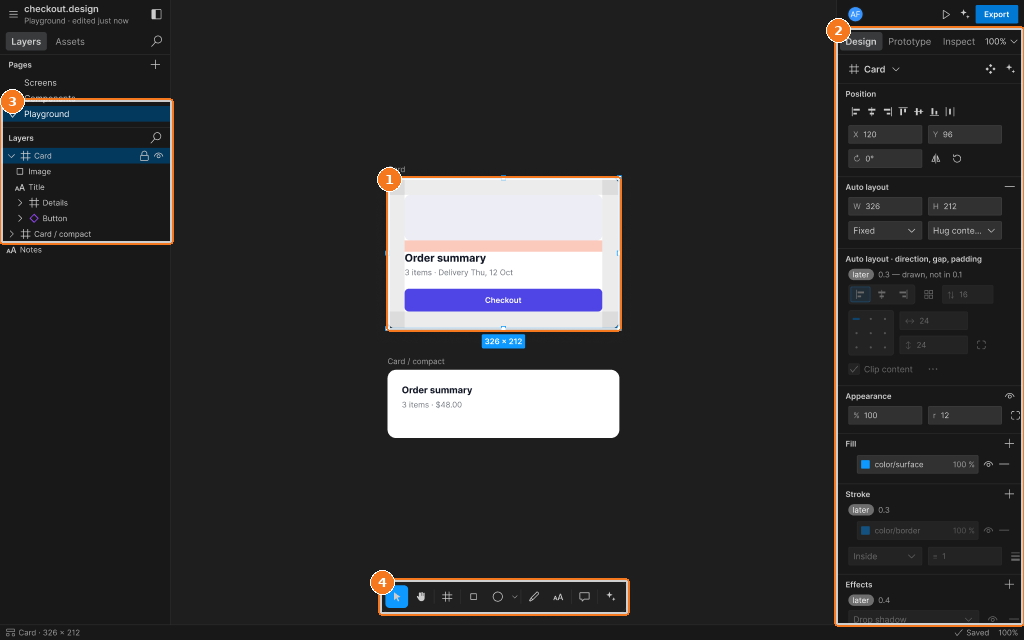
Callouts:
- Auto layout frame selected: padding and gap handles, measure overlays
- Design tab: 0.1 subset editable, later sections badged “later”
- Layers with the frame selected
- Toolbar