S12 Agent working live
An external agent (Claude Code in the terminal) edits the open file through ud and the bridge; the user watches and can stop it. This is the 0.1 exit scenario.
Esta página está em inglês; a tradução está a caminho.
| Purpose | An external agent (Claude Code in the terminal) edits the open file through ud and the bridge; the user watches and can stop it. This is the 0.1 exit scenario. |
| SRS | UI-7, CMD-27, CMD-29, AI-12 |
| Canvas | Agent pill at top centre: Claude avatar, “Claude”, “use_figma”, “12 changes”, Stop. New frame “Rectangles” appearing with nodes flashed in #D97757 and the name tag “Claude”. Layers rows of changed nodes show a 2 px left bar in Claude’s colour. |
| Status | Strip item “Claude editing · Stop”. The S12 frame is 1440 × 922: below the 900 px webview, a 22 px inset labelled “VS Code status bar” shows the VS Code item $(sparkle) Claude editing login.design with tooltip “Stop Claude”. |
| Right panel | Header avatars show Claude’s avatar with a working ring. If the user’s selection is changed by the agent (CMD-26), the Design tab updates and a toast “Claude changed your selection” appears. |
| States | Working; idle; stopped (pill “Claude stopped · Allow again”; further commands rejected with a clear error to the agent; status item gone); two agents (two pills stacked 4 apart, max 3 then “+n agents”); conflict with the user’s drag (user gesture wins; agent command rejected and retried by the agent). |
Figma frame S12 (annotated)
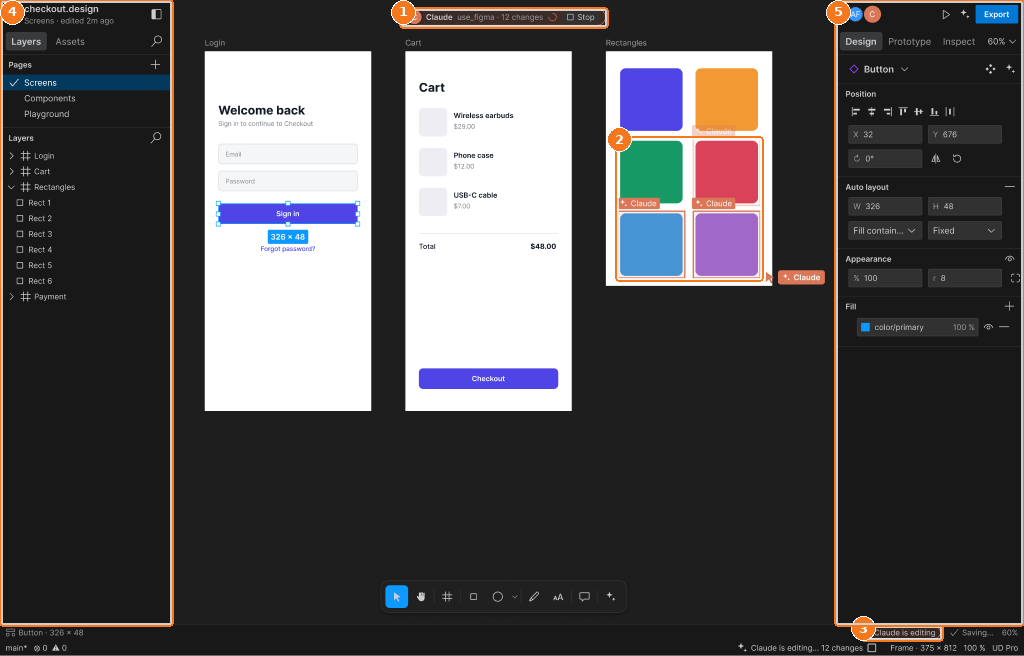
Callouts:
- Agent badge: actor, status, Stop
- Nodes flashing in the actor colour with name tags
- Status bar agent item
- Left panel
- Right panel