S02 Editor with a selection
Default editing state; reference for the whole layout.
Esta página está em inglês; a tradução está a caminho.
| Purpose | Default editing state; reference for the whole layout. |
| SRS | UI-1, CAN-2, CAN-3, CAN-4 |
| Regions | As §3.1: left panel with Pages and Layers; canvas with Login, Cart, Payment, Done frames; right panel Design tab. |
| Contents | Instance “Button” selected inside Login/Form; Layers tree expanded to it and scrolled; selection box with handles and size label “326 × 48”; hover outline on “Email”; status strip “Button 326 × 48”. |
| States | No selection (right panel shows page properties: Page background, Variables modes, Styles in this page summary, Export page); multi-selection (“3 layers”, mixed values); text editing; dragging with smart guides and distance labels. |
Figma frame S02 (annotated)
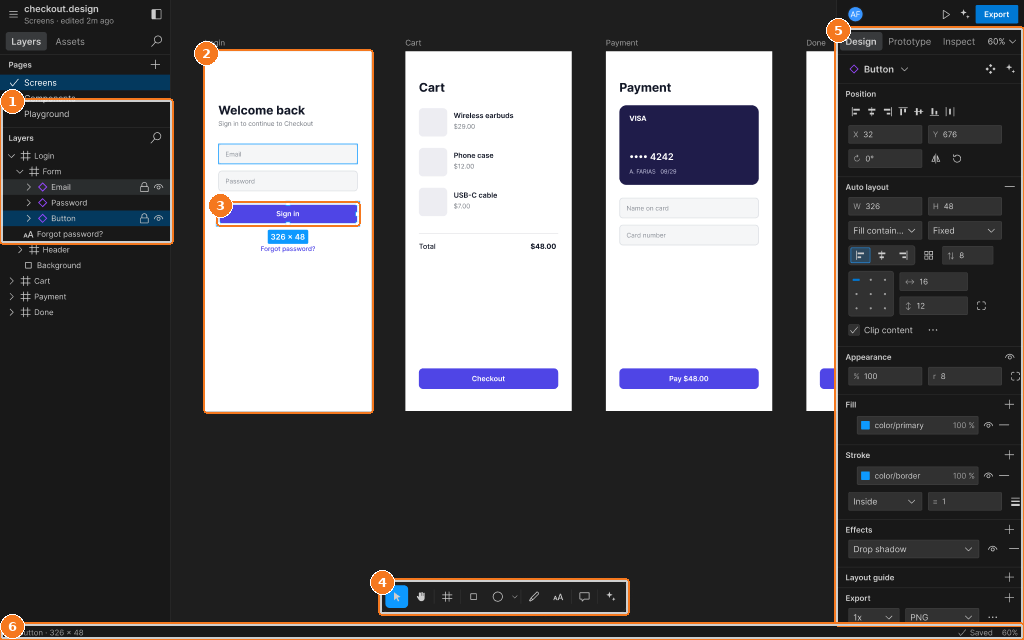
Callouts:
- Layers: Login expanded, Button selected
- Login frame on the canvas
- Selection box with size label
- Toolbar
- Design tab: Position, Auto layout, Appearance, Fill, Stroke, Effects, Export
- Status strip