S01 Empty file and new design
First view of a new or empty .design file; start from a template, an import or a prompt.
Esta página está em inglês; a tradução está a caminho.
| Purpose | First view of a new or empty .design file; start from a template, an import or a prompt. |
| SRS | PLT-7, EXP-4, EXP-5, AI-6, UI-1 |
| Regions | Normal layout. Left panel shows page “Page 1” and an empty Layers section (“No layers. Press F to add a frame.”). Right panel shows the page properties (background colour, variable modes, export). |
| Canvas contents | Centred card 640 wide, raised, radius 8, padding 32: title “Start a design” (display), subtitle muted; row of 5 template cards 112 × 136 (thumbnail 112 × 88, name strong, size tiny muted): Blank, Mobile app 390 × 844, Web 1440 × 1024, Desktop app 1280 × 800, Design system starter. Below: “Import” links (Figma file…, SVG or image…, HTML page…); a 32 tall field “Ask Claude to design…” with sparkle (hidden when ud.ai.enabled is false). Hint at the bottom of the canvas above the tool bar: “Press F for a frame, R for a rectangle, / for quick actions”. |
| States | Default; hover on template card (border focus); creating (card shows spinner, then closes); AI disabled; read-only (cards disabled, banner). |
Figma frame S01 (annotated)
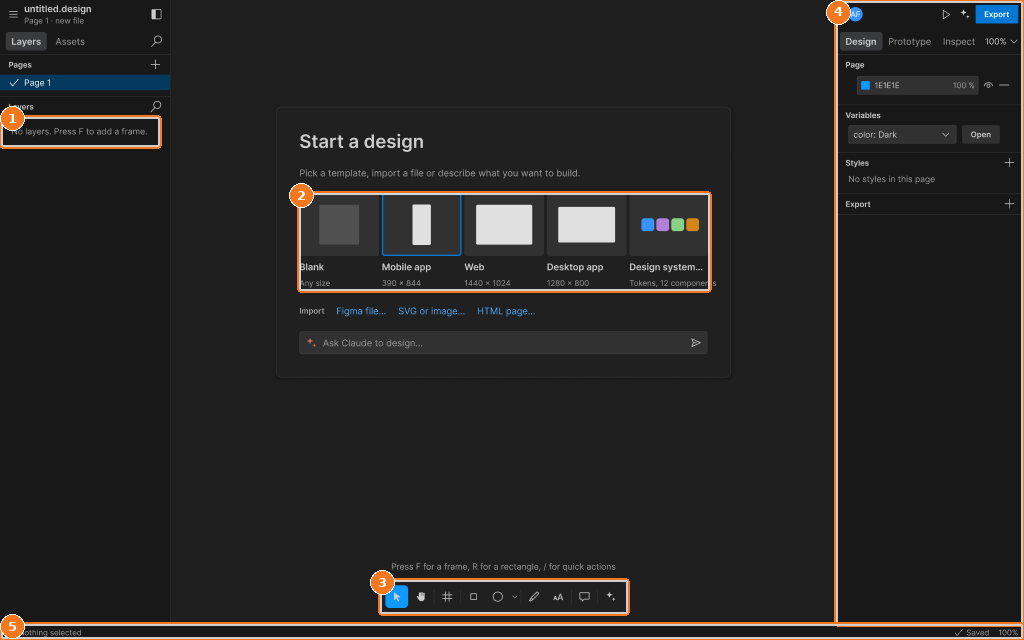
Callouts:
- Layers panel: empty-file state
- Template cards: Blank, Mobile, Web, Desktop, Design system
- Toolbar, bottom centre of the canvas
- Design tab with nothing selected
- Status strip: selection, sync state, zoom